<?xml version="1.0" encoding="utf-8"?>
<feed xmlns="http://www.w3.org/2005/Atom">
    <id>https://blog-ny4cromu1-rlj1202s-projects.vercel.app</id>
    <title>ryuollojy</title>
    <updated>2024-05-23T13:33:42.817Z</updated>
    <generator>https://github.com/jpmonette/feed</generator>
    <author>
        <name>Jisu Sim</name>
        <email>rlj1202@gmail.com</email>
        <uri>https://github.com/rlj1202</uri>
    </author>
    <link rel="alternate" href="https://blog-ny4cromu1-rlj1202s-projects.vercel.app"/>
    <link rel="self" href="https://blog-ny4cromu1-rlj1202s-projects.vercel.app/rss/atom.xml"/>
    <subtitle>rlj1202의 개발 블로그</subtitle>
    <icon>https://blog-ny4cromu1-rlj1202s-projects.vercel.app/favicon.svg</icon>
    <rights>Copyright (c) 2024, Jisu Sim. All rights reserved.</rights>
    <category term="Technologie"/>
    <entry>
        <title type="html"><![CDATA[Nest.js - Worker threads 잘 사용해보기]]></title>
        <id>https://blog-ny4cromu1-rlj1202s-projects.vercel.app/articles/nest-js-worker-threads</id>
        <link href="https://blog-ny4cromu1-rlj1202s-projects.vercel.app/articles/nest-js-worker-threads"/>
        <updated>2024-05-23T21:44:00.000Z</updated>
        <content type="html"><![CDATA[<h2 id="1-worker-thread-생성하기">1. Worker thread 생성하기<a aria-hidden="true" tabindex="-1" href="#1-worker-thread-생성하기"><span class="icon icon-link"></span></a></h2>
<div class="rehype-code-title">main.ts</div><pre><code class="hljs language-ts"><span class="hljs-keyword">import</span> { <span class="hljs-title hljs-class">Injectable</span> } <span class="hljs-keyword">from</span> <span class="hljs-string">'@nestjs/common'</span>;
<span class="hljs-keyword">import</span> { <span class="hljs-title hljs-class">Worker</span> } <span class="hljs-keyword">from</span> <span class="hljs-string">'worker_threads'</span>;
<span class="hljs-keyword">import</span> { once } <span class="hljs-keyword">from</span> <span class="hljs-string">'events'</span>;

<span class="hljs-meta">@Injectable</span>()
<span class="hljs-keyword">export</span> <span class="hljs-keyword">class</span> <span class="hljs-title hljs-class">SomeService</span> {
	<span class="hljs-keyword">async</span> <span class="hljs-title hljs-function">execute</span>(<span class="hljs-params"></span>) {
		<span class="hljs-keyword">const</span> worker = <span class="hljs-keyword">new</span> <span class="hljs-title hljs-class">Worker</span>(<span class="hljs-string">'./worker.js'</span>, { <span class="hljs-attr">workerData</span>: {} });
		
		<span class="hljs-keyword">await</span> <span class="hljs-title hljs-function">once</span>(worker, <span class="hljs-string">'exit'</span>);
	}
}
</code></pre>
<div class="rehype-code-title">worker.ts</div><pre><code class="hljs language-ts"><span class="hljs-keyword">import</span> { isMainThread, workerData, parentPort } <span class="hljs-keyword">from</span> <span class="hljs-string">'worker_threads'</span>;

<span class="hljs-keyword">if</span> (!isMainThread) {
	<span class="hljs-keyword">async</span> <span class="hljs-keyword">function</span> <span class="hljs-title hljs-function">main</span>(<span class="hljs-params"></span>) {
		<span class="hljs-comment">// do something here</span>
		parentPort.<span class="hljs-title hljs-function">postMessage</span>(<span class="hljs-string">'ready'</span>);
	}
	<span class="hljs-title hljs-function">main</span>();
}
</code></pre>
<p>Nest.js는 <code>ts-node</code>를 사용하지 않기 때문에 번들링 툴 등을 사용하지 않는 이상 상대경로가 바뀔일은 없으므로 이에 대해서는 염려하지 않아도 된다. 그러나 상대경로가 하드코딩 된다는 것이 맘에 들지 않는다. 따라서 다음과 같이 바꿔본다.</p>
<div class="rehype-code-title">main.ts</div><pre><code class="hljs language-ts"><span class="hljs-keyword">import</span> run <span class="hljs-keyword">from</span> <span class="hljs-string">'./worker'</span>;

<span class="hljs-meta">@Injectable</span>()
<span class="hljs-keyword">export</span> <span class="hljs-keyword">class</span> <span class="hljs-title hljs-class">SomeService</span> {
	<span class="hljs-keyword">async</span> <span class="hljs-title hljs-function">execute</span>(<span class="hljs-params"></span>) {
		<span class="hljs-keyword">await</span> <span class="hljs-title hljs-function">run</span>({});
	}
}
</code></pre>
<div class="rehype-code-title">worker.ts</div><pre><code class="hljs language-ts"><span class="hljs-keyword">import</span> { <span class="hljs-title hljs-class">Worker</span>, isMainThread, workerData, parentPort } <span class="hljs-keyword">from</span> <span class="hljs-string">'worker_threads'</span>;
<span class="hljs-keyword">import</span> { once } <span class="hljs-keyword">from</span> <span class="hljs-string">'events'</span>;

<span class="hljs-keyword">export</span> <span class="hljs-keyword">default</span> <span class="hljs-keyword">async</span> <span class="hljs-keyword">function</span> <span class="hljs-title hljs-function">run</span>(<span class="hljs-params">params: <span class="hljs-built_in">any</span></span>) {
	<span class="hljs-keyword">const</span> worker = <span class="hljs-keyword">new</span> <span class="hljs-title hljs-class">Worker</span>(__filename, { <span class="hljs-attr">workerData</span>: params });

	<span class="hljs-keyword">const</span> [exitCode] = <span class="hljs-keyword">await</span> <span class="hljs-title hljs-function">once</span>(worker, <span class="hljs-string">'exit'</span>);

	<span class="hljs-keyword">return</span> exitCode <span class="hljs-keyword">as</span> <span class="hljs-built_in">number</span>;
}

<span class="hljs-keyword">if</span> (!isMainThread) {
	<span class="hljs-keyword">async</span> <span class="hljs-keyword">function</span> <span class="hljs-title hljs-function">main</span>(<span class="hljs-params"></span>) {
		<span class="hljs-comment">// do something here</span>
		parentPort.<span class="hljs-title hljs-function">postMessage</span>(<span class="hljs-string">'ready'</span>);
	}
	<span class="hljs-title hljs-function">main</span>();
}
</code></pre>
<p><a href="https://nodejs.org/api/modules.html#__filename"><code>__filename</code></a>이라는 CommonJS의 module wrapper를 통해 제공되는 변수를 이용하여 파일 이름을 하드코딩 하지 않고도 worker를 사용할 수 있다. 다만, 한 가지 문제가 있다.</p>
<p>파일이 실행될 때에 이것이 <code>import</code> 로 인한 모듈 로딩에 의해 실행된 것인지, Worker 생성으로 인해 실행된 것인지가 구분되지 않기 때문에 이런 식으로 구현된 worker에서 같은 방식으로 구현된 다른 worker를 실행한다면 해당 과정에서 발행하는 <code>import</code> 구문으로 인해 자칫하면 쓰레드 무한 생성이 가능하기 때문이다.</p>
<p>따라서 한 가지 규칙을 정해 이를 막아본다. <code>workerData</code>에 항상 쓰레드가 어느 파일에서 시작되었는지 해당 파일의 경로를 전달하는 것이다.</p>
<div class="rehype-code-title">main.ts</div><pre><code class="hljs language-ts"><span class="hljs-keyword">import</span> run <span class="hljs-keyword">from</span> <span class="hljs-string">'./worker'</span>;

<span class="hljs-meta">@Injectable</span>()
<span class="hljs-keyword">export</span> <span class="hljs-keyword">class</span> <span class="hljs-title hljs-class">SomeService</span> {
	<span class="hljs-keyword">async</span> <span class="hljs-title hljs-function">execute</span>(<span class="hljs-params"></span>) {
		<span class="hljs-keyword">await</span> <span class="hljs-title hljs-function">run</span>({});
	}
}
</code></pre>
<div class="rehype-code-title">worker.ts</div><pre><code class="hljs language-ts"><span class="hljs-keyword">import</span> { <span class="hljs-title hljs-class">Worker</span>, workerData } <span class="hljs-keyword">from</span> <span class="hljs-string">'worker_threads'</span>;
<span class="hljs-keyword">import</span> { once } <span class="hljs-keyword">from</span> <span class="hljs-string">'events'</span>;

<span class="hljs-keyword">export</span> <span class="hljs-keyword">default</span> <span class="hljs-keyword">async</span> <span class="hljs-keyword">function</span> <span class="hljs-title hljs-function">run</span>(<span class="hljs-params">params: <span class="hljs-built_in">any</span></span>) {
	<span class="hljs-keyword">const</span> worker = <span class="hljs-keyword">new</span> <span class="hljs-title hljs-class">Worker</span>(__filename, {
		<span class="hljs-attr">workerData</span>: {
			<span class="hljs-attr">entryFile</span>: __filename,
			params,
		},
	});

	<span class="hljs-keyword">const</span> [exitCode] = <span class="hljs-keyword">await</span> <span class="hljs-title hljs-function">once</span>(worker, <span class="hljs-string">'exit'</span>);

	<span class="hljs-keyword">return</span> exitCode <span class="hljs-keyword">as</span> <span class="hljs-built_in">number</span>;
}

<span class="hljs-keyword">if</span> (workerData?.<span class="hljs-property">entryFile</span> === __filename) {
	<span class="hljs-keyword">async</span> <span class="hljs-keyword">function</span> <span class="hljs-title hljs-function">main</span>(<span class="hljs-params">_params: <span class="hljs-built_in">any</span></span>) {
		<span class="hljs-comment">// do something here</span>
		parentPort.<span class="hljs-title hljs-function">postMessage</span>(<span class="hljs-string">'ready'</span>);
	}
	<span class="hljs-title hljs-function">main</span>(workerData.<span class="hljs-property">params</span>);
}
</code></pre>
<p>이렇게 하면 어느 파일을 통해서 쓰레드가 시작되었는지 확인이 가능하기 때문에 worker 내에서 안전하게 같은 방식으로 구현된 다른 worker를 실행할 수 있다.</p>
<p><code>workerData</code>는 어찌됐든 worker thread로 생성된 경우에만 존재하는 객체이므로 <code>isMainThread</code> 변수는 이 상황에서는 딱히 쓸모는 없다.</p>
<h2 id="2-nestjs-ioc-컨테이너-활용하기">2. Nest.js IoC 컨테이너 활용하기<a aria-hidden="true" tabindex="-1" href="#2-nestjs-ioc-컨테이너-활용하기"><span class="icon icon-link"></span></a></h2>
<p>아직은 thread 내에서 Nest.js의 IoC 컨테이너를 활용할 수 없다. <code>NestFactory.createApplicationContext</code> 함수를 활용하여 쓰레드 내에서도 IoC 컨테이너를 활용할 수 있도록 하자.</p>
<div class="rehype-code-title">worker.ts</div><pre><code class="hljs language-ts"><span class="hljs-keyword">import</span> { <span class="hljs-title hljs-class">Worker</span>, workerData } <span class="hljs-keyword">from</span> <span class="hljs-string">'worker_threads'</span>;
<span class="hljs-keyword">import</span> { once } <span class="hljs-keyword">from</span> <span class="hljs-string">'events'</span>;
<span class="hljs-keyword">import</span> { <span class="hljs-title hljs-class">AppModule</span> } <span class="hljs-keyword">from</span> <span class="hljs-string">'./app.module'</span>
<span class="hljs-keyword">import</span> { <span class="hljs-title hljs-class">Injectable</span>, <span class="hljs-title hljs-class">Module</span>, <span class="hljs-title hljs-class">Inject</span> } <span class="hljs-keyword">from</span> <span class="hljs-string">'@nestjs/common'</span>;
<span class="hljs-keyword">import</span> { <span class="hljs-title hljs-class">ConfigService</span> } <span class="hljs-keyword">from</span> <span class="hljs-string">'@nestjs/config'</span>;

<span class="hljs-keyword">export</span> <span class="hljs-keyword">default</span> <span class="hljs-keyword">async</span> <span class="hljs-keyword">function</span> <span class="hljs-title hljs-function">run</span>(<span class="hljs-params">params: <span class="hljs-built_in">any</span></span>) {
	<span class="hljs-keyword">const</span> worker = <span class="hljs-keyword">new</span> <span class="hljs-title hljs-class">Worker</span>(__filename, {
		<span class="hljs-attr">workerData</span>: {
			<span class="hljs-attr">entryFile</span>: __filename,
			params,
		},
	});

	<span class="hljs-keyword">const</span> [exitCode] = <span class="hljs-keyword">await</span> <span class="hljs-title hljs-function">once</span>(worker, <span class="hljs-string">'exit'</span>);

	<span class="hljs-keyword">return</span> exitCode <span class="hljs-keyword">as</span> <span class="hljs-built_in">number</span>;
}

<span class="hljs-meta">@Injectable</span>()
<span class="hljs-keyword">class</span> <span class="hljs-title hljs-class">WorkerService</span> {
	<span class="hljs-title hljs-function">constructor</span>(<span class="hljs-params">
		<span class="hljs-keyword">private</span> <span class="hljs-keyword">readonly</span> configService: ConfigService,
		<span class="hljs-meta">@Inject</span>(<span class="hljs-string">'whatever-you-want'</span>)
		<span class="hljs-keyword">private</span> <span class="hljs-keyword">readonly</span> someClient: SomeClient,
	</span>) {}

	<span class="hljs-keyword">async</span> <span class="hljs-title hljs-function">run</span>(<span class="hljs-params">params: <span class="hljs-built_in">any</span></span>) {
		<span class="hljs-comment">// do something here</span>
	}
}

<span class="hljs-meta">@Module</span>({
	<span class="hljs-attr">imports</span>: [<span class="hljs-title hljs-class">AppModule</span>],
	<span class="hljs-attr">providers</span>: [<span class="hljs-title hljs-class">WorkerService</span>],	
})
<span class="hljs-keyword">class</span> <span class="hljs-title hljs-class">WorkerModule</span> {}

<span class="hljs-keyword">if</span> (workerData?.<span class="hljs-property">entryFile</span> === __filename) {
	<span class="hljs-keyword">async</span> <span class="hljs-keyword">function</span> <span class="hljs-title hljs-function">main</span>(<span class="hljs-params">params: <span class="hljs-built_in">any</span></span>) {
		<span class="hljs-keyword">const</span> app = <span class="hljs-keyword">await</span> <span class="hljs-title hljs-class">NestFactory</span>.<span class="hljs-title hljs-function">createApplicationContext</span>(<span class="hljs-title hljs-class">WorkerModule</span>);
		
		app.<span class="hljs-title hljs-function">enableShutdownHooks</span>();
		
		<span class="hljs-keyword">const</span> service = app.<span class="hljs-title hljs-function">get</span>(<span class="hljs-title hljs-class">WorkerService</span>);
		<span class="hljs-keyword">await</span> service.<span class="hljs-title hljs-function">run</span>(params);
		
		<span class="hljs-keyword">await</span> app.<span class="hljs-title hljs-function">close</span>();
	}
	<span class="hljs-title hljs-function">main</span>(workerData.<span class="hljs-property">params</span>);
}
</code></pre>
<p>몇 가지 주의해야 할 점은 <code>AppModule</code>를 import해서 사용할 것이기 때문에 사용하고 싶은 global이 아닌 서비스가 있다면 <code>AppModule</code>에서 꼭 export를 해주어야 한다. 또, 쓰레드 내에서도 Nest.js의 lifecycle hook이 동일하게 실행되므로 <code>onModuleInit</code> 등에서 단순히 자원 할당이 아닌 호스트 컴퓨터에서 단 한번만 실행하고 싶은 작업의 경우 아까는 쓸모 없다고 했던 <code>isMainThread</code> 변수를 활용하여 메인 쓰레드에서만 동작하도록 해주면 된다. 혹은 해당 작업을 <code>onModuleInit</code> 에서 호출하는 것이 아닌, Nest.js app이 생성되는 <code>bootstrap</code> 함수에서 직접 참조하여 실행시켜 주는 것도 괜찮겠다.</p>
<pre><code class="hljs language-ts"><span class="hljs-comment">// ...</span>
<span class="hljs-meta">@Injectable</span>()
<span class="hljs-keyword">export</span> <span class="hljs-keyword">class</span> <span class="hljs-title hljs-class">FooBarService</span> <span class="hljs-keyword">implements</span> <span class="hljs-title hljs-class">OnModuleInit</span> {
	<span class="hljs-keyword">async</span> <span class="hljs-title hljs-function">onModuleInit</span>(<span class="hljs-params"></span>) {
		<span class="hljs-keyword">if</span> (!isMainThread) <span class="hljs-keyword">return</span>;
		
		<span class="hljs-comment">// do something here</span>
	}
}
</code></pre>
<pre><code class="hljs language-ts"><span class="hljs-comment">// ...</span>
<span class="hljs-keyword">async</span> <span class="hljs-keyword">function</span> <span class="hljs-title hljs-function">bootstrap</span>(<span class="hljs-params"></span>) {
	<span class="hljs-keyword">const</span> app = <span class="hljs-keyword">await</span> <span class="hljs-title hljs-class">NestFactory</span>.<span class="hljs-title hljs-function">create</span>(<span class="hljs-title hljs-class">AppModule</span>);
	<span class="hljs-comment">// ...</span>
	<span class="hljs-keyword">await</span> app.<span class="hljs-title hljs-function">get</span>(<span class="hljs-title hljs-class">SomeService</span>).<span class="hljs-title hljs-function">init</span>();
	<span class="hljs-comment">// ...</span>
	<span class="hljs-keyword">await</span> app.<span class="hljs-title hljs-function">listen</span>(<span class="hljs-number">3000</span>);
}
</code></pre>
<p>또, 쓰레드 내에서 <code>ModuleRef</code>를 사용할 경우 <code>ModuleRef</code>는 기본 동작이 <code>strict: true</code> 이므로, 원하는 인스턴스를 inject할 수 없을수도 있다. 따라서 <code>strict: false</code> 옵션을 주어 해결한다.</p>]]></content>
        <author>
            <name>Jisu Sim</name>
            <email>rlj1202@gmail.com</email>
            <uri>https://github.com/rlj1202</uri>
        </author>
    </entry>
    <entry>
        <title type="html"><![CDATA[Nest.js - Custom provider onApplicationShutdown 훅 사용하기]]></title>
        <id>https://blog-ny4cromu1-rlj1202s-projects.vercel.app/articles/nest-js-custom-provider-dispose</id>
        <link href="https://blog-ny4cromu1-rlj1202s-projects.vercel.app/articles/nest-js-custom-provider-dispose"/>
        <updated>2024-05-23T20:54:00.000Z</updated>
        <content type="html"><![CDATA[<pre><code class="hljs language-ts"><span class="hljs-meta">@Module</span>({
	<span class="hljs-attr">providers</span>: [
		{
			<span class="hljs-attr">provide</span>: <span class="hljs-string">'token'</span>,
			<span class="hljs-attr">useFactory</span>: <span class="hljs-keyword">async</span> () => {
				<span class="hljs-keyword">const</span> <span class="hljs-attr">someClient</span>: unknown;
				
				<span class="hljs-keyword">return</span> someClient;
			},
		},
	],
})
<span class="hljs-keyword">export</span> <span class="hljs-keyword">class</span> <span class="hljs-title hljs-class">AppModule</span> {}
</code></pre>
<p>위와 같은 방법으로 간편하게 custom provider를 Nest.js의 IoC 컨테이너에 제공할 수 있다. 가령, <a href="https://www.npmjs.com/package/redis"><code>redis</code></a> 라이브러리에서 생성한 redis 클라이언트를 제공할 수 있다.</p>
<pre><code class="hljs language-ts"><span class="hljs-keyword">import</span> { createClient } <span class="hljs-keyword">from</span> <span class="hljs-string">'redis'</span>;
<span class="hljs-keyword">import</span> { <span class="hljs-title hljs-class">ConfigService</span> } <span class="hljs-keyword">from</span> <span class="hljs-string">'@nestjs/config'</span>;

<span class="hljs-meta">@Module</span>({
	<span class="hljs-attr">providers</span>: [
		{
			<span class="hljs-attr">provide</span>: <span class="hljs-string">'redis-client'</span>,
			<span class="hljs-attr">useFactory</span>: <span class="hljs-keyword">async</span> (<span class="hljs-attr">configService</span>: <span class="hljs-title hljs-class">ConfigService</span>) => {
				<span class="hljs-keyword">const</span> client = <span class="hljs-keyword">await</span> <span class="hljs-title hljs-function">createClient</span>({
					<span class="hljs-attr">url</span>: configService.<span class="hljs-title hljs-function">get</span>(<span class="hljs-string">'REDIS_URL'</span>),
				}).<span class="hljs-title hljs-function">connect</span>();
				<span class="hljs-keyword">return</span> client;
			},
			<span class="hljs-attr">inject</span>: [<span class="hljs-title hljs-class">ConfigService</span>],
		},
	],
})
<span class="hljs-keyword">export</span> <span class="hljs-keyword">class</span> <span class="hljs-title hljs-class">AppModule</span> {}
</code></pre>
<p>그런데 이렇게만 제공하면 <code>SIGTERM</code> 등으로 종료 시그널을 받아 shutdown hook이 동작할 때에 커넥션이 정리되지 않으면서 어플리케이션이 알아서 종료되지 않는다. 이에 관하여 <code>dispose</code> 기능을 프레임워크 레벨에서 추가할 것을 요구하는 GitHub issue가 있다.</p>
<ul>
<li><a href="https://github.com/nestjs/nest/issues/9497">https://github.com/nestjs/nest/issues/9497</a></li>
</ul>
<p>위 이슈는 <code>Scope.REQUEST</code> 등 스코프가 종료될 때에 provider 자원을 반환하도록 하는 추상화 레이어를 추가해 달라는 요청이기는 하나, 아무튼 이런식으로 provider를 제공할 때에 어떤 식으로 자원을 정리해야 하는지에 대해서는 공식 문서에서도 마땅히 설명되어있는 바는 없다. 좀 간단한 방법을 인터넷에서 찾아보았다.</p>
<h2 id="1-module에서-dispose-시키기">1. Module에서 dispose 시키기<a aria-hidden="true" tabindex="-1" href="#1-module에서-dispose-시키기"><span class="icon icon-link"></span></a></h2>
<p>provider를 제공한 모듈 클래스에서 lifecycle hook을 구현하여 리소스를 정리하는 방법이다.</p>
<pre><code class="hljs language-ts"><span class="hljs-meta">@Module</span>({
	<span class="hljs-attr">providers</span>: [
		{
			<span class="hljs-attr">provide</span>: <span class="hljs-string">'token'</span>,
			<span class="hljs-attr">useFactory</span>: <span class="hljs-keyword">async</span> () => {
				<span class="hljs-keyword">const</span> <span class="hljs-attr">someClient</span>: unknown;
				
				<span class="hljs-keyword">return</span> someClient;
			},
		},
	],
})
<span class="hljs-keyword">export</span> <span class="hljs-keyword">class</span> <span class="hljs-title hljs-class">AppModule</span> <span class="hljs-keyword">implements</span> <span class="hljs-title hljs-class">OnApplicationShutdown</span> {
	<span class="hljs-title hljs-function">constructor</span>(<span class="hljs-params">
		<span class="hljs-meta">@Inject</span>(<span class="hljs-string">'token'</span>)
		<span class="hljs-keyword">private</span> <span class="hljs-keyword">readonly</span> someClient: SomeClient,
	</span>) {}

	<span class="hljs-keyword">async</span> <span class="hljs-title hljs-function">onApplicationShutdown</span>(<span class="hljs-params"></span>) {
		<span class="hljs-keyword">await</span> <span class="hljs-variable hljs-language">this</span>.<span class="hljs-property">someClient</span>.<span class="hljs-title hljs-function">close</span>(); <span class="hljs-comment">// or something similar</span>
	}
}
</code></pre>
<p>간단하기는 하나, 한 자원에 대한 코드가 한 파일 내에서 서로 떨어져있어 썩 맘에 들지는 않는다. (다른 provider 코드가 더 많아진다면 더더욱이)</p>
<ul>
<li><a href="https://stackoverflow.com/questions/63753467/how-to-close-database-connection-in-nestjs-service">https://stackoverflow.com/questions/63753467/how-to-close-database-connection-in-nestjs-service</a></li>
</ul>
<h2 id="2-provider-객체에-lifecycle-hook-추가하기">2. Provider 객체에 lifecycle hook 추가하기<a aria-hidden="true" tabindex="-1" href="#2-provider-객체에-lifecycle-hook-추가하기"><span class="icon icon-link"></span></a></h2>
<p>객체에 직접 <code>onApplicationShutdown</code> 함수를 삽입하는 방법이다. TypeScript 환경이기 때문에 <code>object['onApplicationShutdown'] = async () => { return; };</code>과 같은 불편한(?) 방법 말고 조금 더 괜찮은 방법이 있다.</p>
<pre><code class="hljs language-ts"><span class="hljs-meta">@Module</span>({
	<span class="hljs-attr">providers</span>: [
		{
			<span class="hljs-attr">provide</span>: <span class="hljs-string">'token'</span>,
			<span class="hljs-attr">useFactory</span>: <span class="hljs-keyword">async</span> () => {
				<span class="hljs-keyword">const</span> <span class="hljs-attr">someClient</span>: unknown;

				(someClient <span class="hljs-keyword">as</span> unknown <span class="hljs-keyword">as</span> <span class="hljs-title hljs-class">OnApplicationShutdown</span>)
					.<span class="hljs-property">onApplicationShutdown</span> = <span class="hljs-keyword">async</span> () => {
						<span class="hljs-comment">// do something here</span>

						<span class="hljs-keyword">return</span>;
					};
				
				<span class="hljs-keyword">return</span> someClient;
			},
		},
	],
})
<span class="hljs-keyword">export</span> <span class="hljs-keyword">class</span> <span class="hljs-title hljs-class">AppModule</span> {}
</code></pre>
<p>이번에는 코드가 한 군데 몰려있어 깔끔하다.</p>
<p><code>@nestjs/bullmq</code> 라이브러리에서 해당 패턴을 확인할 수 있다.</p>
<ul>
<li><a href="https://github.com/nestjs/bull/blob/ec3443cf5bca407455a9dd1770f2e4f41098b8ac/packages/bullmq/lib/bull.providers.ts#L67">https://github.com/nestjs/bull/blob/ec3443cf5bca407455a9dd1770f2e4f41098b8ac/packages/bullmq/lib/bull.providers.ts#L67</a></li>
</ul>]]></content>
        <author>
            <name>Jisu Sim</name>
            <email>rlj1202@gmail.com</email>
            <uri>https://github.com/rlj1202</uri>
        </author>
    </entry>
    <entry>
        <title type="html"><![CDATA[Node.js graceful shutdown]]></title>
        <id>https://blog-ny4cromu1-rlj1202s-projects.vercel.app/articles/nodejs-graceful-shutdown</id>
        <link href="https://blog-ny4cromu1-rlj1202s-projects.vercel.app/articles/nodejs-graceful-shutdown"/>
        <updated>2023-10-10T16:03:09.000Z</updated>
        <content type="html"><![CDATA[<h2 id="구현">구현<a aria-hidden="true" tabindex="-1" href="#구현"><span class="icon icon-link"></span></a></h2>
<p>node.js를 이용해서 http 서버를 운영 중인 경우 안전하게 어플리케이션을 종료하기 위해서는 기본적으로 아래와 같은 과정을 거쳐야 한다.</p>
<ol>
<li>서버의 listening 소켓을 닫는다.</li>
<li>새로운 요청을 모두 거절한다.</li>
<li>기존 요청이 완료될 때 까지 기다린다.</li>
<li>기타 나머지 작업을 처리한다. (DB 연결 종료 등)</li>
</ol>
<p>일단, shutdown 신호를 받기 위해 <code>SIGINT</code>를 이용한다. <a href="https://pm2.keymetrics.io/">PM2</a> 등에서 rolling update를 위해 프로세스로 먼저 <a href="https://pm2.keymetrics.io/docs/usage/signals-clean-restart/">이 시그널을 보내기도 한다</a>. 터미널에서는 보통 <a href="https://en.wikipedia.org/wiki/Control-C#In_command-line_environments">Ctrl+C</a>로 이 <code>SIGINT</code>를 보낼 수 있다. (필요에 따라 <code>SIGINT</code> 말고 <code>SIGUSR1</code>, <code>SIGUSR2</code> 등을 이용해도 되겠다)</p>
<pre><code class="hljs language-javascript"><span class="hljs-keyword">let</span> isTerminating = <span class="hljs-literal">false</span>;

process.<span class="hljs-title hljs-function">on</span>(<span class="hljs-string">'SIGINT'</span>, <span class="hljs-function">() =></span> {
    isTerminating = <span class="hljs-literal">true</span>;
});
</code></pre>
<p>먼저, <code>server.close</code> 함수를 통해 listening 소켓을 닫아 새로운 연결을 막도록 하자.</p>
<pre><code class="hljs language-javascript">process.<span class="hljs-title hljs-function">on</span>(<span class="hljs-string">'SIGINT'</span>, <span class="hljs-function">() =></span> {
    isTerminating = <span class="hljs-literal">true</span>;
    
    server.<span class="hljs-title hljs-function">close</span>(<span class="hljs-function">(<span class="hljs-params">err</span>) =></span> {
        <span class="hljs-keyword">if</span> (err) {
	        <span class="hljs-variable hljs-language">console</span>.<span class="hljs-title hljs-function">error</span>(err);
            process.<span class="hljs-title hljs-function">exit</span>(<span class="hljs-number">1</span>);
        } <span class="hljs-keyword">else</span> {
            process.<span class="hljs-title hljs-function">exit</span>(<span class="hljs-number">0</span>);
        }
    });
});
</code></pre>
<p><code>http.Server</code>의 <a href="https://nodejs.org/dist/latest-v18.x/docs/api/http.html#serverclosecallback">close</a> 함수는 listening하고 있는 소켓만 닫을 뿐, 이미 열려 통신하고 있는 소켓들은 손대지 않고 모두 종료될 때 까지 기다린 후 callback 함수를 호출한다.</p>
<p>listening 소켓은 닫았더라도 클라이언트와 서버 사이에서 <a href="https://en.wikipedia.org/wiki/HTTP_persistent_connection">http keepAlive</a>를 사용하게 될 경우 기존 소켓들이 계속 열려있어 새로운 요청이 들어올 수 있기 때문에 이를 거절해야 한다. 따라서 idle 소켓을 임의로 모두 끊어준다.</p>
<p>idle인지 아닌지 판단하는 방법은 단일 요청이 시작되고 끝날 때 마다 idle 여부를 체크하는 것이다.</p>
<pre><code class="hljs language-javascript">server.<span class="hljs-title hljs-function">on</span>(<span class="hljs-string">'request'</span>, <span class="hljs-function">(<span class="hljs-params">req, res</span>) =></span> {
    <span class="hljs-keyword">const</span> socket = req.<span class="hljs-property">socket</span>;
    
    socket.<span class="hljs-property">$$idle</span> = <span class="hljs-literal">false</span>;
    
    res.<span class="hljs-title hljs-function">on</span>(<span class="hljs-string">'finish'</span>, <span class="hljs-function">() =></span> {
        socket.<span class="hljs-property">$$idle</span> = <span class="hljs-literal">true</span>;
    });
});
</code></pre>
<p>HTTP 1.1 에서는 커넥션 당 요청과 응답의 순서가 보장되는 통신을 하므로 위와 같이 idle 유무만 확인하더라도 큰 문제는 없다. 하지만 HTTP 2.0를 사용하게 된다면 idle 유무가 아니라 처리 중인 요청 수를 세어야 하겠다. <sup><a href="#user-content-fn-1" id="user-content-fnref-1" data-footnote-ref="" aria-describedby="footnote-label">1</a></sup> <sup><a href="#user-content-fn-2" id="user-content-fnref-2" data-footnote-ref="" aria-describedby="footnote-label">2</a></sup></p>
<p>node.js의 Server 클래스에는 현재 연결된 소켓 목록 따로 제공하고 있지 않으므로 idle 소켓을 모두 끊기 위해서는 현재 소켓들을 직접 추적해야 한다.</p>
<pre><code class="hljs language-javascript"><span class="hljs-keyword">const</span> connections = <span class="hljs-keyword">new</span> <span class="hljs-title hljs-class">Set</span>();

server.<span class="hljs-title hljs-function">on</span>(<span class="hljs-string">'connection'</span>, <span class="hljs-function">(<span class="hljs-params">socket</span>) =></span> {
    <span class="hljs-keyword">if</span> (isTerminating) {
        socket.<span class="hljs-title hljs-function">destory</span>();
        <span class="hljs-keyword">return</span>;
    }

    connections.<span class="hljs-title hljs-function">add</span>(socket);
    
    socket.<span class="hljs-property">$$idle</span> = <span class="hljs-literal">true</span>;
    
    socket.<span class="hljs-title hljs-function">on</span>(<span class="hljs-string">'close'</span>, <span class="hljs-function">() =></span> {
	    connections.<span class="hljs-title hljs-function">delete</span>(socket);
    });
});
</code></pre>
<p>만일 <a href="https://nodejs.org/dist/latest-v18.x/docs/api/http.html#class-httpserver"><code>http.Server</code></a>가 아니라 <a href="https://nodejs.org/dist/latest-v18.x/docs/api/https.html#class-httpsserver"><code>https.Server</code></a>를 사용할 경우 <code>connection</code>이 아니라 <code>secureConnection</code>을 사용해야 한다.</p>
<p>후에 이 <code>Set</code>을 이용해서 일괄 종료를 할 수 있다.</p>
<pre><code class="hljs language-javascript"><span class="hljs-keyword">for</span> (<span class="hljs-keyword">const</span> socket <span class="hljs-keyword">of</span> connections) {
    <span class="hljs-keyword">if</span> (isTerminating &#x26;&#x26; socket.<span class="hljs-property">$$isIdle</span>) socket.<span class="hljs-title hljs-function">destroy</span>();
}
connections.<span class="hljs-title hljs-function">clear</span>();
</code></pre>
<p>idle이 아닌 소켓에 대해서는 마지막 요청 처리를 마친 후 끊어질 수 있도록 다음과 같이 코드를 수정한다.</p>
<pre><code class="hljs language-javascript">server.<span class="hljs-title hljs-function">on</span>(<span class="hljs-string">'request'</span>, <span class="hljs-function">(<span class="hljs-params">req, res</span>) =></span> {
    <span class="hljs-keyword">const</span> socket = req.<span class="hljs-property">socket</span>;
    
    socket.<span class="hljs-property">$$idle</span> = <span class="hljs-literal">false</span>;
    
    res.<span class="hljs-title hljs-function">on</span>(<span class="hljs-string">'finish'</span>, <span class="hljs-function">() =></span> {
        socket.<span class="hljs-property">$$idle</span> = <span class="hljs-literal">true</span>;
        
        <span class="hljs-keyword">if</span> (isTerminating) socket.<span class="hljs-title hljs-function">destroy</span>();
    });
});
</code></pre>
<p>다른 방법으로 새로운 요청 시 응답 헤더에 <code>Connection: close</code>를 달아주는 방법이 있다. <a href="https://expressjs.com/">express</a> 라이브러리 등을 사용한다면 middleware로 손쉽게 추가할 수 있겠다.</p>
<pre><code class="hljs language-javascript"><span class="hljs-keyword">const</span> app = <span class="hljs-title hljs-function">express</span>();

app.<span class="hljs-title hljs-function">use</span>(<span class="hljs-function">(<span class="hljs-params">req, res, next</span>) =></span> {
    <span class="hljs-keyword">if</span> (isTerminating &#x26;&#x26; !res.<span class="hljs-property">headersSent</span>) {
	    res.<span class="hljs-title hljs-function">set</span>(<span class="hljs-string">'Connection'</span>, <span class="hljs-string">'close'</span>);
    }
    
    <span class="hljs-title hljs-function">next</span>();
});
</code></pre>
<p>특정 프레임워크에 종속되길 원치 않는다면 아래와 같은 방법으로 헤더를 추가할 수 있다.</p>
<pre><code class="hljs language-javascript">server.<span class="hljs-title hljs-function">on</span>(<span class="hljs-string">'request'</span>, <span class="hljs-function">(<span class="hljs-params">req, res</span>) =></span> {
    <span class="hljs-keyword">if</span> (isTerminating &#x26;&#x26; !res.<span class="hljs-property">headersSent</span>) {
	    res.<span class="hljs-title hljs-function">setHeader</span>(<span class="hljs-string">'Connection'</span>, <span class="hljs-string">'close'</span>);
	}
});
</code></pre>
<p>그런데 이 방법만을 사용 시에는 새로운 요청이 들어오지 않는다면 소켓 close가 트리거 되지 않는다. 따라서 명확하게 idle 소켓을 확인하여 <code>destory</code> 하는 것이 좋아보인다.</p>
<h2 id="구현된-패키지">구현된 패키지<a aria-hidden="true" tabindex="-1" href="#구현된-패키지"><span class="icon icon-link"></span></a></h2>
<p>이런 식으로 이미 구현된 패키지가 많이 있다. 다운로드 수가 좀 있어보이는 패키지를 몇 살펴보았다.</p>
<ul>
<li><a href="https://www.npmjs.com/package/http-shutdown">https://www.npmjs.com/package/http-shutdown</a>
<ul>
<li>소켓 커넥션을 관리하기 위해서 <code>Set</code>이 아니라 일반 <code>Object</code> 및 단조 증가하는 정수 변수 하나를 이용한다.
<ul>
<li>이 경우, 보통의 경우 왠만하면 그럴 일은 없겠지만 <code>Number</code>의 표현의 최대값에 도달할 경우 더 이상 값이 증가하지 않기 때문에 문제가 생길 수 있어보인다. (문제가 생기기 전에 서버가 재시작 될 확률이 더 커보인다)</li>
<li><a href="https://stackoverflow.com/questions/19054891/does-javascript-handle-integer-overflow-and-underflow-if-yes-how">https://stackoverflow.com/questions/19054891/does-javascript-handle-integer-overflow-and-underflow-if-yes-how</a></li>
</ul>
</li>
<li>응답 헤더에 Connection 헤더를 따로 추가하지는 않는다.</li>
</ul>
</li>
<li><a href="https://www.npmjs.com/package/http-graceful-shutdown">https://www.npmjs.com/package/http-graceful-shutdown</a>
<ul>
<li>위와 동일하게 소켓 커넥션 관리를 위해 일반 Object 및 단조 증가하는 정수 변수 하나를 이용한다.</li>
<li><code>res.headersSent</code>를 확인하여 필요 시 <code>Connection: close</code> 헤더를 달아준다.</li>
</ul>
</li>
<li><a href="https://www.npmjs.com/package/@gquittet/graceful-server">https://www.npmjs.com/package/@gquittet/graceful-server</a>
<ul>
<li>소켓 커넥션 관리를 위해 Set 자료구조를 사용한다.</li>
<li><code>res.headersSent</code>를 확인하여 필요 시 <code>Connection: close</code> 헤더를 달아준다.</li>
<li>소켓 idle을 따로 체크하지는 않는다. 그냥 소켓을 부숴버린다.</li>
</ul>
</li>
<li><a href="https://www.npmjs.com/package/@moebius/http-graceful-shutdown">https://www.npmjs.com/package/@moebius/http-graceful-shutdown</a>
<ul>
<li>소켓 커넥션 관리를 위해 Object를 사용한다.</li>
<li>응답 헤더에 Connection 헤더를 따로 추가하지는 않는다.</li>
</ul>
</li>
</ul>
<section data-footnotes="" class="footnotes"><h2 class="sr-only" id="footnote-label">각주<a aria-hidden="true" tabindex="-1" href="#footnote-label"><span class="icon icon-link"></span></a></h2>
<ol>
<li id="user-content-fn-1">
<p><a href="https://www.dashlane.com/blog/implementing-nodejs-http-graceful-shutdown">https://www.dashlane.com/blog/implementing-nodejs-http-graceful-shutdown</a> <a href="#user-content-fnref-1" data-footnote-backref="" class="data-footnote-backref" aria-label="본문으로 돌아가기">↩</a></p>
</li>
<li id="user-content-fn-2">
<p><a href="https://freecontent.manning.com/animation-http-1-1-vs-http-2-vs-http-2-with-push/">https://freecontent.manning.com/animation-http-1-1-vs-http-2-vs-http-2-with-push/</a>) <a href="#user-content-fnref-2" data-footnote-backref="" class="data-footnote-backref" aria-label="본문으로 돌아가기">↩</a></p>
</li>
</ol>
</section>]]></content>
        <author>
            <name>Jisu Sim</name>
            <email>rlj1202@gmail.com</email>
            <uri>https://github.com/rlj1202</uri>
        </author>
    </entry>
    <entry>
        <title type="html"><![CDATA[KafkaJS의 heartbeatInterval값은 heartbeat의 동작 주기를 보장하지 않는다]]></title>
        <id>https://blog-ny4cromu1-rlj1202s-projects.vercel.app/articles/kafkajs-heartbeat-interval</id>
        <link href="https://blog-ny4cromu1-rlj1202s-projects.vercel.app/articles/kafkajs-heartbeat-interval"/>
        <updated>2023-08-24T11:46:00.000Z</updated>
        <content type="html"><![CDATA[<h2 id="요약">요약<a aria-hidden="true" tabindex="-1" href="#요약"><span class="icon icon-link"></span></a></h2>
<p>KafkaJS의 <code>heartbeatInterval</code>은 consumer가 group coordinator에게 보내는 heartbeat의 주기가 설정된 값보다 빠르지 않도록 제한할 뿐이다.</p>
<h2 id="발생하는-문제">발생하는 문제<a aria-hidden="true" tabindex="-1" href="#발생하는-문제"><span class="icon icon-link"></span></a></h2>
<p>해당 시험에 사용된 라이브러리와 Kafka의 버전은 다음과 같다.</p>
<ul>
<li><strong><a href="https://kafka.js.org/">KafkaJS</a></strong>: 2.2.4</li>
<li><strong>Kafka</strong>: <a href="https://hub.docker.com/layers/confluentinc/cp-kafka/7.4.1.arm64/images/sha256-f6364cb703a723c586f303dcbfc36d09e6320c1711b4f6c8d29ad2ff659b16b8?context=explore">confluentinc/cp-kafka:7.4.1.arm64</a> Docker Image</li>
</ul>
<p>KafkaJS에서 consumer를 만들 때 다음과 같이 <code>heartbeatInterval</code> 옵션을 지정해 줄 수 있다.</p>
<pre><code class="hljs language-javascript"><span class="hljs-keyword">const</span> { <span class="hljs-title hljs-class">Kafka</span> } = <span class="hljs-built_in">require</span>(<span class="hljs-string">'kafkajs'</span>);

<span class="hljs-keyword">const</span> kafka = <span class="hljs-keyword">new</span> <span class="hljs-title hljs-class">Kafka</span>({
  <span class="hljs-attr">clientId</span>: <span class="hljs-string">'test-app'</span>,
  <span class="hljs-attr">brokers</span>: [<span class="hljs-string">'localhost:9092'</span>, <span class="hljs-string">'localhost:9093'</span>, <span class="hljs-string">'localhost:9094'</span>],
});

<span class="hljs-keyword">const</span> consumer = kafka.<span class="hljs-title hljs-function">consumer</span>({
  <span class="hljs-attr">groupId</span>: <span class="hljs-string">'test-group'</span>,
  <span class="hljs-attr">heartbeatInterval</span>: <span class="hljs-number">3000</span>,
});
</code></pre>
<p>이 값의 기본값은 3000ms이며, 문서에는 다음과 같이 적혀있다.</p>
<p><a href="https://kafka.js.org/docs/consuming#a-name-options-a-options">https://kafka.js.org/docs/consuming#a-name-options-a-options</a></p>
<blockquote>
<p>The expected time in milliseconds between heartbeats to the consumer coordinator. Heartbeats are used to ensure that the consumer's session stays active. The value must be set lower than session timeout</p>
</blockquote>
<p>동작 시간을 보장한다고 적혀있진 않다. 그 외에 정확히 어떻게 동작하는지에 대한 구체적인 설명은 없다.</p>
<pre><code class="hljs language-javascript"><span class="hljs-keyword">const</span> consumer = kafka.<span class="hljs-title hljs-function">consumer</span>({
  <span class="hljs-attr">groupId</span>: <span class="hljs-string">'test-group'</span>,
  <span class="hljs-attr">sessionTimeout</span>: <span class="hljs-number">1000</span>, <span class="hljs-comment">// broker의 group.min.session.timeout.ms도 1000으로 낮춰주었다</span>
  <span class="hljs-attr">heartbeatInterval</span>: <span class="hljs-number">333</span>,
});
</code></pre>
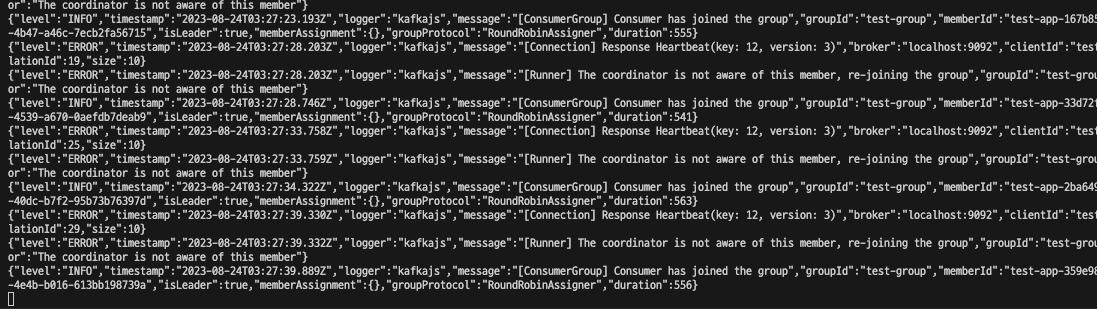
<p>이렇게 옵션을 설정한다면 기대하기로는 session time-out 시간인 1초 내에 333ms마다 heartbeat를 보내기 때문에 아무런 이상이 없을 것 같다. 하지만 이렇게만 설정하면 계속해서 rebalancing이 일어남을 알 수 있다.</p>
<figure><img src="/assets/kafkajs-heartbeat-interval/image-20230824122743556.png" alt="&#x27;Consumer has joined the group&#x27; 문구가 지속적으로 보인다"><figcaption>'Consumer has joined the group' 문구가 지속적으로 보인다</figcaption></figure>
<h2 id="어째서">어째서?<a aria-hidden="true" tabindex="-1" href="#어째서"><span class="icon icon-link"></span></a></h2>
<p>아래는 <code>heartbeatInterval</code>값이 쓰이는 코드이다.</p>
<ul>
<li><a href="https://github.com/tulios/kafkajs/blob/ff3b1117f316d527ae170b550bc0f772614338e9/src/consumer/consumerGroup.js#L132">https://github.com/tulios/kafkajs/blob/ff3b1117f316d527ae170b550bc0f772614338e9/src/consumer/consumerGroup.js#L132</a></li>
</ul>
<div class="rehype-code-title">src/consumer/consumerGroup.js</div><pre><code class="hljs language-javascript">	<span class="hljs-comment">// ...</span>
    <span class="hljs-variable hljs-language">this</span>[<span class="hljs-variable hljs-constant">PRIVATE</span>.<span class="hljs-property">SHARED_HEARTBEAT</span>] = <span class="hljs-title hljs-function">sharedPromiseTo</span>(<span class="hljs-keyword">async</span> ({ interval }) => {
      <span class="hljs-keyword">const</span> { groupId, generationId, memberId } = <span class="hljs-variable hljs-language">this</span>
      <span class="hljs-keyword">const</span> now = <span class="hljs-title hljs-class">Date</span>.<span class="hljs-title hljs-function">now</span>()

      <span class="hljs-keyword">if</span> (memberId &#x26;&#x26; now >= <span class="hljs-variable hljs-language">this</span>.<span class="hljs-property">lastRequest</span> + interval) {
        <span class="hljs-keyword">const</span> payload = {
          groupId,
          memberId,
          <span class="hljs-attr">groupGenerationId</span>: generationId,
        }

        <span class="hljs-keyword">await</span> <span class="hljs-variable hljs-language">this</span>.<span class="hljs-property">coordinator</span>.<span class="hljs-title hljs-function">heartbeat</span>(payload)
        <span class="hljs-variable hljs-language">this</span>.<span class="hljs-property">instrumentationEmitter</span>.<span class="hljs-title hljs-function">emit</span>(<span class="hljs-variable hljs-constant">HEARTBEAT</span>, payload)
        <span class="hljs-variable hljs-language">this</span>.<span class="hljs-property">lastRequest</span> = <span class="hljs-title hljs-class">Date</span>.<span class="hljs-title hljs-function">now</span>()
      }
    })
    <span class="hljs-comment">// ...</span>
</code></pre>
<p>여기서 <code>interval</code> 매개변수로 위에서 설정한 <code>heartbeatInterval</code>값이 들어가는데, 함수를 호출할 때 마다 마지막으로 heartbeat를 보낸 시점에서 해당 interval 만큼 지났는지 여부를 확인한다.</p>
<p>KafkaJS에서는 fetch 요청을 보낼 때 같이 heartbeat를 보내는 식으로 naive하게 구현되어 있다.</p>
<ul>
<li><a href="https://github.com/tulios/kafkajs/blob/ff3b1117f316d527ae170b550bc0f772614338e9/src/consumer/runner.js#L378">https://github.com/tulios/kafkajs/blob/ff3b1117f316d527ae170b550bc0f772614338e9/src/consumer/runner.js#L378</a></li>
</ul>
<div class="rehype-code-title">src/consumer/runner.js</div><pre><code class="hljs language-javascript">  <span class="hljs-keyword">async</span> <span class="hljs-title hljs-function">handleBatch</span>(<span class="hljs-params">batch</span>) {
    <span class="hljs-comment">// ...</span>

    <span class="hljs-keyword">const</span> onBatch = <span class="hljs-keyword">async</span> batch => {
      <span class="hljs-keyword">if</span> (batch.<span class="hljs-title hljs-function">isEmptyDueToFiltering</span>()) {
        <span class="hljs-comment">// ...</span>

        <span class="hljs-keyword">await</span> <span class="hljs-variable hljs-language">this</span>.<span class="hljs-title hljs-function">heartbeat</span>()
        <span class="hljs-keyword">return</span>
      }

      <span class="hljs-keyword">if</span> (batch.<span class="hljs-title hljs-function">isEmpty</span>()) {
        <span class="hljs-keyword">await</span> <span class="hljs-variable hljs-language">this</span>.<span class="hljs-title hljs-function">heartbeat</span>()
        <span class="hljs-keyword">return</span>
      }

      <span class="hljs-comment">// ...</span>

      <span class="hljs-keyword">await</span> <span class="hljs-variable hljs-language">this</span>.<span class="hljs-title hljs-function">autoCommitOffsets</span>()
      <span class="hljs-keyword">await</span> <span class="hljs-variable hljs-language">this</span>.<span class="hljs-title hljs-function">heartbeat</span>()
    }

    <span class="hljs-keyword">await</span> <span class="hljs-title hljs-function">onBatch</span>(batch)
  }
</code></pre>
<p>그리고 무한 루프를 돌면서 fetch 요청을 보내는 데, 이 속도는 <code>maxWaitTimeInMs</code>에 의해 제한된다. 해당 옵션은 fetch 요청을 서버가 받은 직후 바로 응답을 하는 것이 아니라, <code>max.poll.records</code>만큼의 데이터가 쌓여 있으면 바로 보내고 그렇지 않으면 해당 시간 만큼 기다린 후에 응답을 보낸다.</p>
<ul>
<li><a href="https://kafka.js.org/docs/consuming#a-name-options-a-options">https://kafka.js.org/docs/consuming#a-name-options-a-options</a></li>
</ul>
<blockquote>
<p>The maximum amount of time in milliseconds the server will block before answering the fetch request if there isn’t sufficient data to immediately satisfy the requirement given by <code>minBytes</code></p>
</blockquote>
<p>그리고 KafkaJS에서 이 값의 기본값은 5000ms이다.</p>
<p>즉, 아무것도 하지 않는 상태에서 연결만 한다면 heartbeat는 기본값인 3000ms가 아닌 5000ms 주기로 보내진다.</p>
<pre><code class="hljs language-javascript"><span class="hljs-keyword">const</span> { <span class="hljs-title hljs-class">Kafka</span>, logLevel } = <span class="hljs-built_in">require</span>(<span class="hljs-string">'kafkajs'</span>);

<span class="hljs-keyword">const</span> kafka = <span class="hljs-keyword">new</span> <span class="hljs-title hljs-class">Kafka</span>({
  <span class="hljs-attr">clientId</span>: <span class="hljs-string">'test-app'</span>,
  <span class="hljs-attr">brokers</span>: [<span class="hljs-string">'localhost:9092'</span>, <span class="hljs-string">'localhost:9093'</span>, <span class="hljs-string">'localhost:9094'</span>],
  <span class="hljs-attr">logLevel</span>: logLevel.<span class="hljs-property">DEBUG</span>,
});

<span class="hljs-keyword">const</span> consumer = kafka.<span class="hljs-title hljs-function">consumer</span>({
  <span class="hljs-attr">groupId</span>: <span class="hljs-string">'test-group'</span>,
});

<span class="hljs-keyword">async</span> <span class="hljs-keyword">function</span> <span class="hljs-title hljs-function">main</span>(<span class="hljs-params"></span>) {
  <span class="hljs-keyword">await</span> consumer.<span class="hljs-title hljs-function">connect</span>();
  <span class="hljs-keyword">await</span> consumer.<span class="hljs-title hljs-function">run</span>({
    <span class="hljs-attr">eachMessage</span>: <span class="hljs-keyword">async</span> ({ topic, partition, message }) => {
      <span class="hljs-variable hljs-language">console</span>.<span class="hljs-title hljs-function">log</span>({ topic, partition, <span class="hljs-attr">value</span>: message.<span class="hljs-property">value</span> });
    },
  });
}
<span class="hljs-title hljs-function">main</span>();
</code></pre>
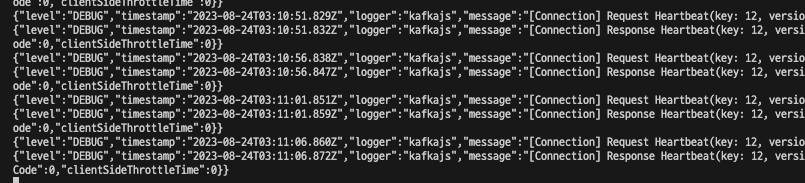
<figure><img src="/assets/kafkajs-heartbeat-interval/image-20230824121525479.png" alt="Request Heartbeat의 실행 시간을 잘 보면 5초 간격임을 알 수 있다"><figcaption>Request Heartbeat의 실행 시간을 잘 보면 5초 간격임을 알 수 있다</figcaption></figure>
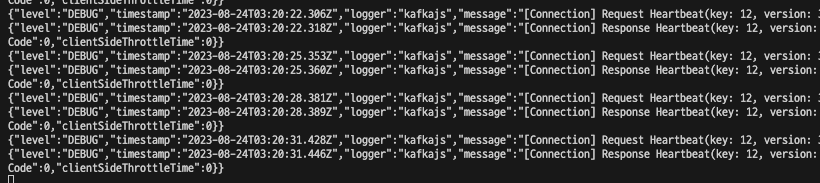
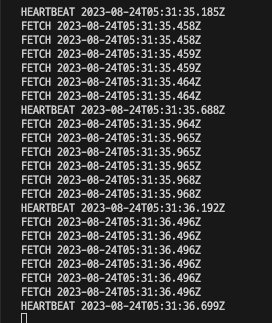
<p>log level을 <code>DEBUG</code>로 변경하고 연결만 한 상태에서 로그를 확인해 보면 5초 주기로 heartbeat를 보내고 있음을 확인할 수 있다. 여기서 <code>maxWaitTimeInMs</code>를 100ms로 변경하고 다시 실행시키면 주기가 3초로 짧아짐을 볼 수 있다.</p>
<pre><code class="hljs language-javascript"><span class="hljs-keyword">const</span> consumer = kafka.<span class="hljs-title hljs-function">consumer</span>({
  <span class="hljs-attr">groupId</span>: <span class="hljs-string">'test-group'</span>,
  <span class="hljs-attr">maxWaitTimeInMs</span>: <span class="hljs-number">100</span>,
});
</code></pre>
<figure><img src="/assets/kafkajs-heartbeat-interval/image-20230824122037564.png" alt="Request Heartbeat의 실행 주기가 3초로 짧아짐을 볼 수 있다"><figcaption>Request Heartbeat의 실행 주기가 3초로 짧아짐을 볼 수 있다</figcaption></figure>
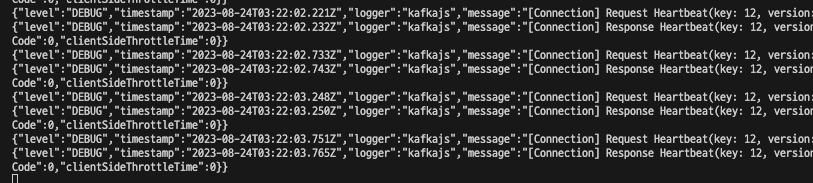
<p>이 상태에서는 heartbeat 주기를 더 빠르게 변경할 수 있다.</p>
<pre><code class="hljs language-javascript"><span class="hljs-keyword">const</span> consumer = kafka.<span class="hljs-title hljs-function">consumer</span>({
  <span class="hljs-attr">groupId</span>: <span class="hljs-string">'test-group'</span>,
  <span class="hljs-attr">maxWaitTimeInMs</span>: <span class="hljs-number">100</span>,
  <span class="hljs-attr">heartbeatInterval</span>: <span class="hljs-number">500</span>,
});
</code></pre>
<figure><img src="/assets/kafkajs-heartbeat-interval/image-20230824122206193.png" alt="Request Heartbeat의 실행 주기가 0.5초로 짧아짐을 볼 수 있다"><figcaption>Request Heartbeat의 실행 주기가 0.5초로 짧아짐을 볼 수 있다</figcaption></figure>
<h2 id="다른-nodejs-kafka-client들">다른 Node.js Kafka Client들<a aria-hidden="true" tabindex="-1" href="#다른-nodejs-kafka-client들"><span class="icon icon-link"></span></a></h2>
<p>Node.js 생태계에서 Kafka Client의 다른 구현체를 찾으면 KafkaJS외에 다음 두 가지가 있다.</p>
<ol>
<li><a href="https://www.npmjs.com/package/node-rdkafka">node-rdkafka</a>
<ul>
<li>블리자드에서 만든 패키지</li>
<li><code>librdkafka</code>의 nodejs wrapper 버전이라고 한다
<ul>
<li><a href="https://github.com/confluentinc/librdkafka">librdkafka</a>는 Confluent에서 만든 것으로 보인다.</li>
</ul>
</li>
<li>Confluent 홈페이지에서 Node.js에서 설명할 때 이 패키지를 사용하는 것 같다.
<ul>
<li><a href="https://developer.confluent.io/get-started/nodejs/">https://developer.confluent.io/get-started/nodejs/</a></li>
</ul>
</li>
</ul>
</li>
<li><a href="https://www.npmjs.com/package/kafka-node">kafka-node</a></li>
</ol>
<p>글 작성 시점 기준으로 kafka-node는 마지막으로 업데이트 된지 몇 년 되었고 KafkaJS도 6개월이 지났는데 node-rdkafka는 1개월 전에도 업데이트 이력이 있다.</p>
<p><a href="https://npmtrends.com/kafka-node-vs-kafkajs-vs-node-rdkafka">https://npmtrends.com/kafka-node-vs-kafkajs-vs-node-rdkafka</a></p>
<p>그래서 node-rdkafka를 사용해보기로 한다. 해당 라이브러리를 설치하여 비슷한 설정 값을 넣고 테스트를 해보았다.</p>
<pre><code class="hljs language-javascript"><span class="hljs-keyword">const</span> <span class="hljs-title hljs-class">Kafka</span> = <span class="hljs-built_in">require</span>(<span class="hljs-string">'node-rdkafka'</span>);

<span class="hljs-keyword">const</span> consumer = <span class="hljs-keyword">new</span> <span class="hljs-title hljs-class">Kafka</span>.<span class="hljs-title hljs-class">KafkaConsumer</span>(
  {
    <span class="hljs-string">'session.timeout.ms'</span>: <span class="hljs-number">1000</span>,
    <span class="hljs-string">'heartbeat.interval.ms'</span>: <span class="hljs-number">333</span>,
    <span class="hljs-string">'group.id'</span>: <span class="hljs-string">'rdkafka'</span>,
    <span class="hljs-string">'metadata.broker.list'</span>: <span class="hljs-string">'localhost:9092,localhost:9093,localhost:9094'</span>,
    <span class="hljs-attr">debug</span>: <span class="hljs-string">'consumer,topic,fetch,cgrp'</span>,
  },
  {}
);

consumer.<span class="hljs-title hljs-function">connect</span>();

consumer
  .<span class="hljs-title hljs-function">on</span>(<span class="hljs-string">'ready'</span>, <span class="hljs-function">() =></span> {
    consumer.<span class="hljs-title hljs-function">subscribe</span>([<span class="hljs-string">'test-topic'</span>]);
    consumer.<span class="hljs-title hljs-function">consume</span>();
  })
  .<span class="hljs-title hljs-function">on</span>(<span class="hljs-string">'data'</span>, <span class="hljs-function">(<span class="hljs-params">data</span>) =></span> {
    <span class="hljs-variable hljs-language">console</span>.<span class="hljs-title hljs-function">log</span>(data);
  })
  .<span class="hljs-title hljs-function">on</span>(<span class="hljs-string">'event.log'</span>, <span class="hljs-function">(<span class="hljs-params">event</span>) =></span> {
    <span class="hljs-variable hljs-language">console</span>.<span class="hljs-title hljs-function">log</span>(event.<span class="hljs-property">fac</span>, <span class="hljs-keyword">new</span> <span class="hljs-title hljs-class">Date</span>().<span class="hljs-title hljs-function">toISOString</span>());
  });
</code></pre>
<figure><img src="/assets/kafkajs-heartbeat-interval/image-20230824143138595.png" alt="입력한 333ms보다는 느리지만 session timeout 되지 않고 잘 작동한다"><figcaption>입력한 333ms보다는 느리지만 session timeout 되지 않고 잘 작동한다</figcaption></figure>
<p>기대하는 대로 동작한다! 몇 가지 다른 값을 넣어서 테스트해보았는데, 대체로 입력한 값보다 약간 느리게 작동하지만 의도한 대로 작동함을 알 수 있었다.</p>]]></content>
        <author>
            <name>Jisu Sim</name>
            <email>rlj1202@gmail.com</email>
            <uri>https://github.com/rlj1202</uri>
        </author>
    </entry>
    <entry>
        <title type="html"><![CDATA[아주대학교 공지사항 봇 만들기]]></title>
        <id>https://blog-ny4cromu1-rlj1202s-projects.vercel.app/articles/ajou-bot</id>
        <link href="https://blog-ny4cromu1-rlj1202s-projects.vercel.app/articles/ajou-bot"/>
        <updated>2023-08-20T17:19:00.000Z</updated>
        <content type="html"><![CDATA[<p>GitHub에 올라와 있는 기존에 다른 사람이 만들어 놓은 아주대 공지사항 봇들은 대부분 만든지 1 ~ 2년 정도 지났고 현재까지 생활 반응(?)을 보이는 것은 <a href="https://github.com/ajou-hack/notice-rss">이것</a>이 유일했다. 만드신 분이 따로 유지보수를 하고 있는 것 같지는 않지만 GitHub Action을 통해 지금까지도 잘 작동하고 있다. 처음에 해당 레포를 많이 참고하였다. 특이한 점은 Rust언어를 사용하셨다는 점이다.</p>
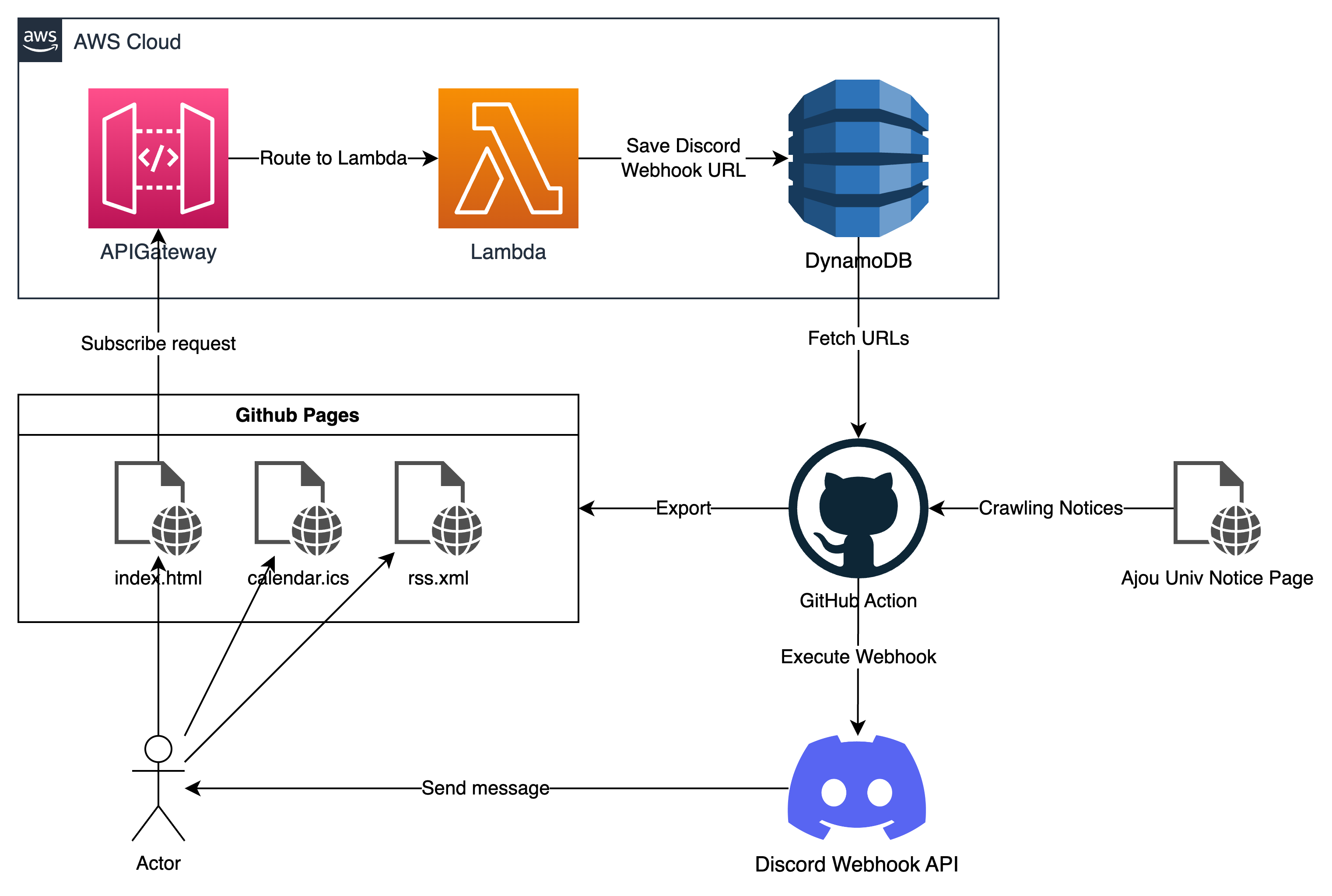
<h2 id="전체-구조">전체 구조<a aria-hidden="true" tabindex="-1" href="#전체-구조"><span class="icon icon-link"></span></a></h2>
<img src="/assets/ajou-bot/image-20230820161946001.png" alt="">
<p>GitHub Action에는 cron으로 작업을 스케줄링 할 수 있다.</p>
<div class="rehype-code-title">.github/workflows/export.yml</div><pre><code class="hljs language-yaml"><span class="hljs-attr">on:</span>
  <span class="hljs-attr">push:</span>
    <span class="hljs-attr">branches:</span>
      <span class="hljs-bullet">-</span> <span class="hljs-string">main</span>
  <span class="hljs-attr">schedule:</span>
    <span class="hljs-bullet">-</span> <span class="hljs-attr">cron:</span> <span class="hljs-string">"0 0-9 * * *"</span>
</code></pre>
<p>시간대는 UTC를 따르기 때문에 위 cron 식에서는 한국 시간대 기준으로 오전 9시부터 오후 6시 까지 동작한다. 동작하는 것 까지는 좋은데 <a href="https://yceffort.kr/2021/01/from-github-workflow-to-firebase-functions">제시간에 동작하지 않는다는 문제</a>가 있다. 심할때는 1시간 넘게 작업이 지연될 때도 있는데 시간이 정확해야 하는 작업은 아니니 괜찮다.</p>
<p>cron으로 작업이 실행될 때 마다 공지사항을 크롤링 한 뒤 rss 생성 및 Discord Webhook 알림을 보낸다.</p>
<h2 id="크롤링-및-rss-만들기">크롤링 및 RSS 만들기<a aria-hidden="true" tabindex="-1" href="#크롤링-및-rss-만들기"><span class="icon icon-link"></span></a></h2>
<p>기존 RSS에서 마음에 들지 않았던 것은 내용을 미리 볼 수 없었던 것이다. 물론 RSS 리더 마다 웹사이트 링크가 있는 경우 해당 페이지를 읽어와 바로 볼 수 있게 되어있는 경우도 있다. 아래는 Thunderbird에 RSS를 구독한 경우다.</p>
<img src="/assets/ajou-bot/image-20230820163950152.png" alt="">
<p>그냥 제목만 딸랑 달려있다. 그래서 아래처럼 보이게 만들었다.</p>
<img src="/assets/ajou-bot/image-20230820164332705.png" alt="">
<p>물론 이렇게 하려면 공지사항 별로 크롤링을 한 번씩 더 해야 한다. <a href="https://cheerio.js.org/">cheerio</a>를 사용했다.</p>
<h2 id="discord-webhook">Discord Webhook<a aria-hidden="true" tabindex="-1" href="#discord-webhook"><span class="icon icon-link"></span></a></h2>
<p><a href="https://discord.com/developers/docs/resources/webhook">https://discord.com/developers/docs/resources/webhook</a></p>
<p>처음에는 디스코드 봇을 따로 만들까 했는데 알림만 보낼건데 너무 귀찮았다.</p>
<img src="/assets/ajou-bot/image-20230820165214963.png" alt="">
<p>웹훅은 URL을 POST로 호출만 하면 되기 때문에 간편하다. 한 가지 문제는 다른 사람이 알림을 받아보기 위해서는 동적으로 웹훅을 등록하고 읽어올 수 있어야 한다는 것이다. 돈 들이지 않고 이를 구현하려면 <a href="https://utteranc.es/">utterances</a>처럼 GitHub Repository의 issue 혹은 discussion등을 이용해 볼 수도 있겠으나 사용자 친화적이지 않다. 마침 인턴 중에 AWS Lambda를 사용해볼 일이 있어서 Lambda와 DynamoDB를 이용했다.</p>
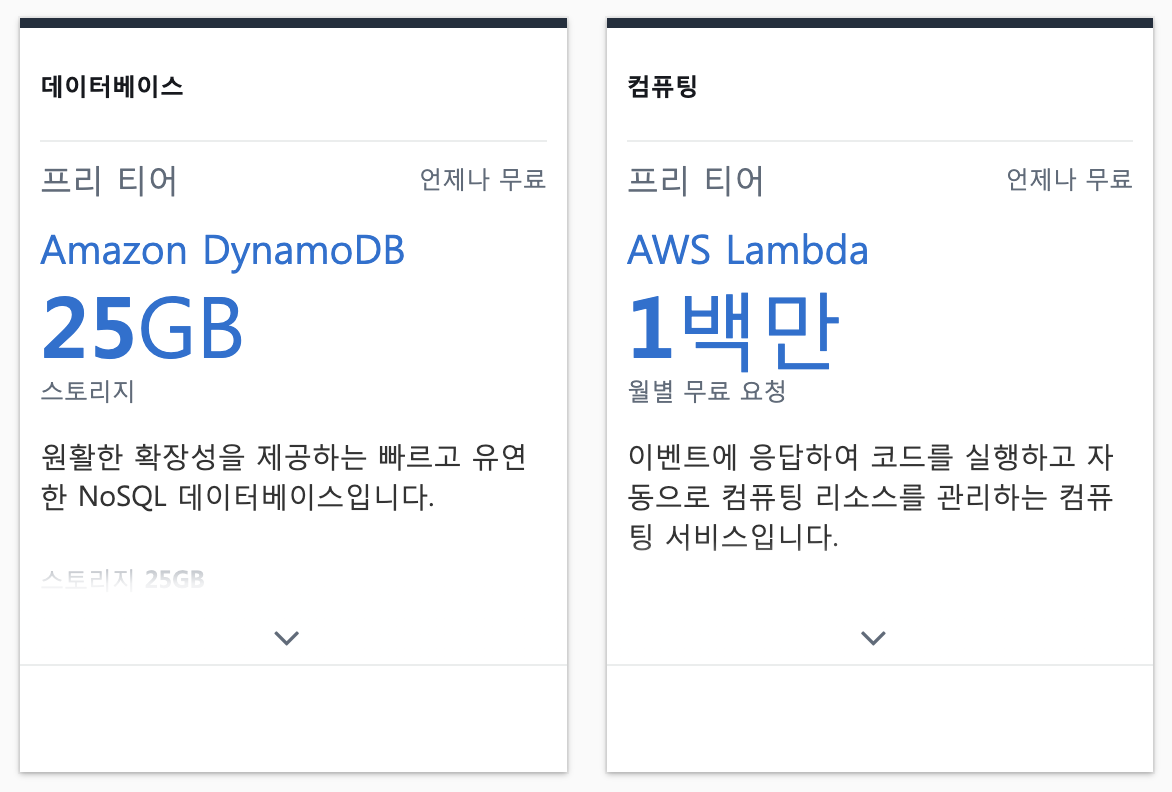
<p>Lambda와 DynamoDB의 장점은 <a href="https://aws.amazon.com/ko/free/?all-free-tier.sort-by=item.additionalFields.SortRank&#x26;all-free-tier.sort-order=asc&#x26;awsf.Free%20Tier%20Types=tier%23always-free&#x26;awsf.Free%20Tier%20Categories=*all">Always Free Tier</a>에 속해있기 때문에 이런 토이 프로젝트에서는 충분히 쓰고도 남는 스펙을 제공한다. (이것이 serverless…?)</p>
<img src="/assets/ajou-bot/image-20230820170720053.png" alt="">
<p>배포에는 <a href="https://www.serverless.com/">Serverless Framework</a>를 이용했다. <code>serverless.yml</code>에 필요한 자원(Lambda function, DynamoDB 등)을 적어놓기만 하면 Cloudformation으로 생성까지 알아서 해준다.</p>
<div class="rehype-code-title">serverless.yml</div><pre><code class="hljs language-yaml"><span class="hljs-attr">functions:</span>
  <span class="hljs-attr">subscribe:</span>
    <span class="hljs-attr">handler:</span> <span class="hljs-string">index.subscribe</span>
    <span class="hljs-attr">events:</span>
      <span class="hljs-bullet">-</span> <span class="hljs-attr">httpApi:</span>
          <span class="hljs-attr">path:</span> <span class="hljs-string">/subscribe</span>
          <span class="hljs-attr">method:</span> <span class="hljs-string">post</span>
  <span class="hljs-attr">unsubscribe:</span>
    <span class="hljs-attr">handler:</span> <span class="hljs-string">index.unsubscribe</span>
    <span class="hljs-attr">events:</span>
      <span class="hljs-bullet">-</span> <span class="hljs-attr">httpApi:</span>
          <span class="hljs-attr">path:</span> <span class="hljs-string">/unsubscribe</span>
          <span class="hljs-attr">method:</span> <span class="hljs-string">post</span>

<span class="hljs-attr">resources:</span>
  <span class="hljs-attr">Resources:</span>
    <span class="hljs-attr">AjouBotDiscordDynamoDbTable:</span>
      <span class="hljs-attr">Type:</span> <span class="hljs-string">AWS::DynamoDB::Table</span>
      <span class="hljs-attr">Properties:</span>
        <span class="hljs-attr">TableName:</span> <span class="hljs-string">${self:custom.tableName}</span>
        <span class="hljs-attr">ProvisionedThroughput:</span>
          <span class="hljs-attr">ReadCapacityUnits:</span> <span class="hljs-number">1</span>
          <span class="hljs-attr">WriteCapacityUnits:</span> <span class="hljs-number">1</span>
        <span class="hljs-attr">AttributeDefinitions:</span>
          <span class="hljs-bullet">-</span> <span class="hljs-attr">AttributeName:</span> <span class="hljs-string">webhook-id</span>
            <span class="hljs-attr">AttributeType:</span> <span class="hljs-string">N</span>
          <span class="hljs-bullet">-</span> <span class="hljs-attr">AttributeName:</span> <span class="hljs-string">webhook-token</span>
            <span class="hljs-attr">AttributeType:</span> <span class="hljs-string">S</span>
        <span class="hljs-attr">KeySchema:</span>
          <span class="hljs-bullet">-</span> <span class="hljs-attr">AttributeName:</span> <span class="hljs-string">webhook-id</span>
            <span class="hljs-attr">KeyType:</span> <span class="hljs-string">HASH</span>
          <span class="hljs-bullet">-</span> <span class="hljs-attr">AttributeName:</span> <span class="hljs-string">webhook-token</span>
            <span class="hljs-attr">KeyType:</span> <span class="hljs-string">RANGE</span>
</code></pre>
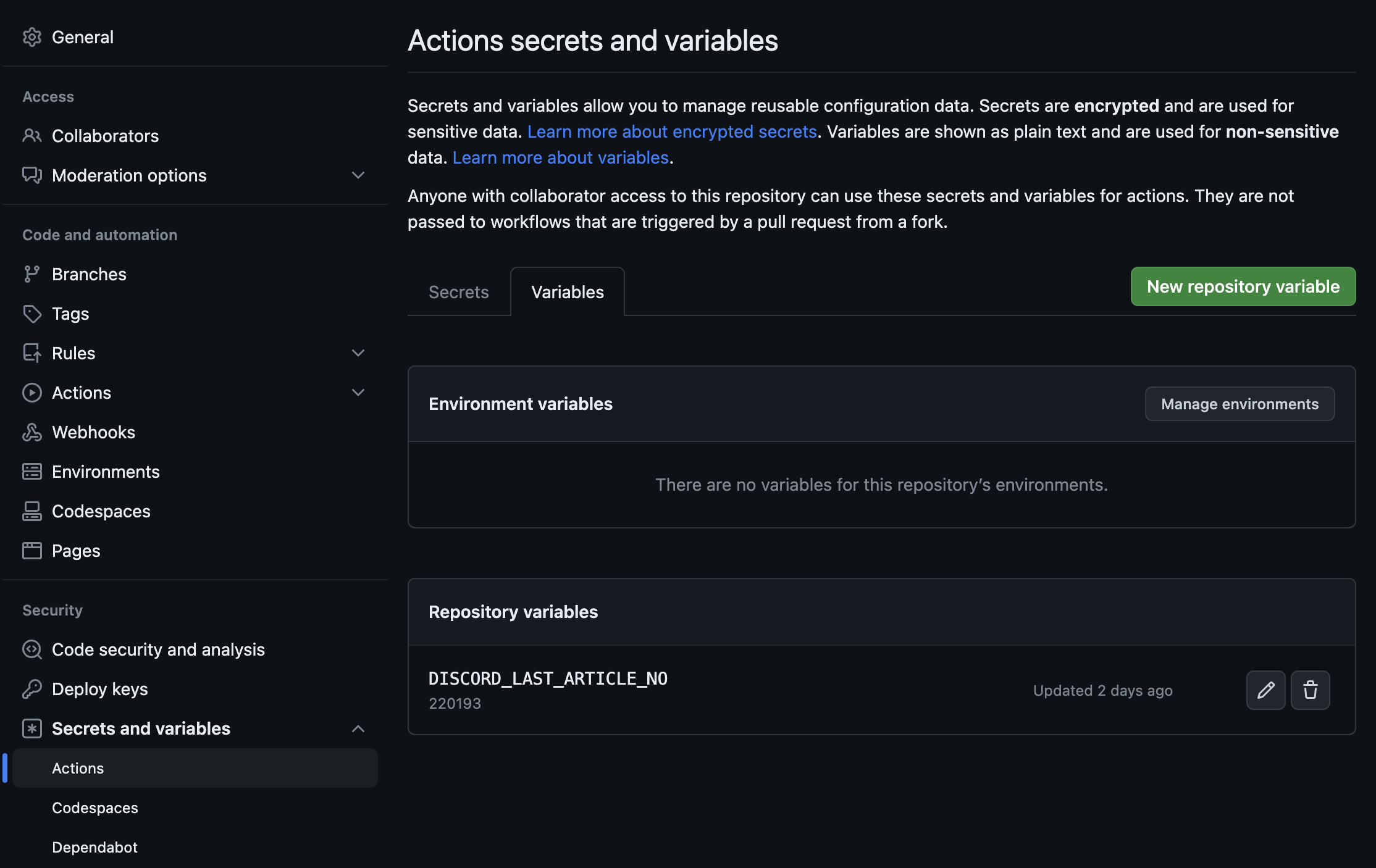
<p>알림을 보내려면 마지막으로 알림을 보낸 게시물이 무엇인지 알아야 한다. 해당 게시물의 id를 저장하는 것은 <a href="https://docs.github.com/en/actions/learn-github-actions/variables">GitHub Repository Variable</a>을 이용했다.</p>
<img src="/assets/ajou-bot/image-20230820173203091.png" alt="">
<p>GitHub API를 이용하면 해당 변수를 갱신할 수 있다.</p>
<div class="rehype-code-title">apps/discord/src/main.ts</div><pre><code class="hljs language-typescript"><span class="hljs-keyword">async</span> <span class="hljs-keyword">function</span> <span class="hljs-title hljs-function">setDiscordLastArticleNo</span>(<span class="hljs-params">value: <span class="hljs-built_in">string</span></span>) {
  <span class="hljs-keyword">await</span> octokit.<span class="hljs-title hljs-function">request</span>(
    <span class="hljs-string">"PATCH /repos/{owner}/{repo}/actions/variables/{name}"</span>,
    {
      <span class="hljs-attr">owner</span>: <span class="hljs-string">"rlj1202"</span>,
      <span class="hljs-attr">repo</span>: <span class="hljs-string">"ajou-bot"</span>,
      <span class="hljs-attr">name</span>: <span class="hljs-string">"DISCORD_LAST_ARTICLE_NO"</span>,
      <span class="hljs-attr">value</span>: <span class="hljs-string">`<span class="hljs-subst">${value}</span>`</span>,
      <span class="hljs-attr">headers</span>: {
        <span class="hljs-string">"X-GitHub-Api-Version"</span>: <span class="hljs-string">"2022-11-28"</span>,
      },
    },
  );
}
</code></pre>
<p>변수의 값을 이용할 때는 GitHub Action 실행 시 환경변수로 넣어줄 수 있다.</p>
<div class="rehype-code-title">.github/workflows/export.yml</div><pre><code class="hljs language-yaml">      <span class="hljs-bullet">-</span> <span class="hljs-attr">name:</span> <span class="hljs-string">Run</span> <span class="hljs-string">Discord</span> <span class="hljs-string">Script</span>
        <span class="hljs-attr">run:</span> <span class="hljs-string">npm</span> <span class="hljs-string">run</span> <span class="hljs-string">start:discord</span>
        <span class="hljs-attr">env:</span>
          <span class="hljs-attr">GITHUB_TOKEN:</span> <span class="hljs-string">${{</span> <span class="hljs-string">steps.generate_token.outputs.token</span> <span class="hljs-string">}}</span>
          <span class="hljs-attr">DISCORD_LAST_ARTICLE_NO:</span> <span class="hljs-string">${{</span> <span class="hljs-string">vars.DISCORD_LAST_ARTICLE_NO</span> <span class="hljs-string">}}</span> <span class="hljs-comment"># &#x3C;- 여기!</span>
          <span class="hljs-attr">DISCORD_WEBHOOK_TEST:</span> <span class="hljs-string">${{</span> <span class="hljs-string">secrets.DISCORD_WEBHOOK_TEST</span> <span class="hljs-string">}}</span>
          <span class="hljs-attr">AWS_ACCESS_KEY_ID:</span> <span class="hljs-string">${{</span> <span class="hljs-string">secrets.AWS_ACCESS_KEY_ID</span> <span class="hljs-string">}}</span>
          <span class="hljs-attr">AWS_SECRET_ACCESS_KEY:</span> <span class="hljs-string">${{</span> <span class="hljs-string">secrets.AWS_SECRET_ACCESS_KEY</span> <span class="hljs-string">}}</span>
        <span class="hljs-attr">continue-on-error:</span> <span class="hljs-literal">true</span>
</code></pre>
<h2 id="웹훅-구독-페이지">웹훅 구독 페이지<a aria-hidden="true" tabindex="-1" href="#웹훅-구독-페이지"><span class="icon icon-link"></span></a></h2>
<p>APIGateway 주소가 있으니 이걸 간편하게 호출할 간단한 웹페이지가 있으면 된다. 그래서 그냥 군대에서 상황보고 유틸 페이지를 메모장으로 만들던 향수를 느끼며 쌩 html 파일 하나를 작성해서 GitHub Pages로 <a href="https://rlj1202.github.io/ajou-bot">배포</a>했다.</p>
<img src="/assets/ajou-bot/image-20230820171045946.png" alt="">
<h2 id="링크">링크<a aria-hidden="true" tabindex="-1" href="#링크"><span class="icon icon-link"></span></a></h2>
<ul>
<li><a href="https://github.com/rlj1202/ajou-bot">https://github.com/rlj1202/ajou-bot</a></li>
</ul>]]></content>
        <author>
            <name>Jisu Sim</name>
            <email>rlj1202@gmail.com</email>
            <uri>https://github.com/rlj1202</uri>
        </author>
    </entry>
    <entry>
        <title type="html"><![CDATA[Bottom-up으로 알아보는 SSL/TLS]]></title>
        <id>https://blog-ny4cromu1-rlj1202s-projects.vercel.app/articles/bottom-up-ssl-tls</id>
        <link href="https://blog-ny4cromu1-rlj1202s-projects.vercel.app/articles/bottom-up-ssl-tls"/>
        <updated>2023-07-08T00:04:00.000Z</updated>
        <content type="html"><![CDATA[<h2 id="ssltls은-무엇인가요">SSL/TLS은 무엇인가요?<a aria-hidden="true" tabindex="-1" href="#ssltls은-무엇인가요"><span class="icon icon-link"></span></a></h2>
<p>SSL은 <strong>Secure Sockets Layer</strong>의 약자로, 컴퓨터 네트워크에 통신 보안을 위해 설계된 암호 규약입니다. <a href="https://ko.wikipedia.org/wiki/HTTPS">https</a> 프로토콜에 사용됩니다. 이 글에서는 실제 hand-shaking과정 또는 메세지 포맷 등 구체적인 작동 절차에 대한 내용은 포함하지 않습니다. 이러한 절차가 어떠한 필요로 인해 생겼는지, 어떻게 해서 실제로 네트워크 상에서 양단의 두 사용자가 안전하게 정보를 주고받을 수 있었는지 등의 내용을 공부하면서 정리해본 글입니다.</p>
<h2 id="비밀-편지를-주고받고-싶어요">비밀 편지를 주고받고 싶어요<a aria-hidden="true" tabindex="-1" href="#비밀-편지를-주고받고-싶어요"><span class="icon icon-link"></span></a></h2>
<img src="/assets/bottom-up-ssl-tls/image-20230813174148877.png" alt="">
<p>철수와 영희가 안전하게 비밀 편지를 주고받고자 합니다. 따라서 편지의 내용을 암호화 하고 복호화 할 수 있는 방법을 찾아야 합니다. 암호화 방식에는 크게 <strong>대칭키</strong> 방식과 <strong>비대칭키</strong> 방식이 있습니다. 대칭키 방식은 하나의 키로 암호화 및 복호화를 모두 할 수 있는 방식을 말하고, 비대칭키 방식은 하나의 키로는 암호화를 하고 다른 키로 복호화를 해야하는 방식을 말합니다. 이 때 두 키를 <strong>공개키</strong>, <strong>비밀키</strong>(혹은 개인키)라고 합니다. 철수와 영희가 편지로 비밀을 주고받기 이전에 대면으로 먼저 만나서 서로 대칭키 혹은 비대칭키를 한 번만 교환하고 나면 그 후부터는 서로 안전하게 비밀 편지를 주고받을 수 있을 것입니다. 둘 중 어떤 방식을 선택하는 것이 좋을까요?</p>
<p>비대칭키 방식은 대칭키 방식과 비교해서 암호화 및 복호화를 하는데 더 많은 시간과 비용이 소모됩니다. 편지의 내용이 많으면 많아질수록 더욱 그렇습니다. 매번 이 방식으로 편지를 주고 받는다면 두 사람 모두 금방 지칠 것입니다. 그래서 비대칭키 대신 대칭키를 사용해서 서로 편지의 내용을 암호화하여 주고받기로 결정합니다. 여기까지 정한 절차는 이렇습니다.</p>
<blockquote>
<ol>
<li>철수는 대칭키로 편지를 암호화하여 영희에게 보낸다.</li>
<li>영희는 대칭키로 편지를 복호화한다.</li>
</ol>
</blockquote>
<p>반대로 영희가 철수에게 편지를 보낼 때도 마찬가지입니다.</p>
<h2 id="대칭키는-무엇으로-정하지">대칭키는 무엇으로 정하지?<a aria-hidden="true" tabindex="-1" href="#대칭키는-무엇으로-정하지"><span class="icon icon-link"></span></a></h2>
<p>철수와 영희가 서로 사전에 대면으로 만나서 키를 하나 정하고 나면 서로 비밀 편지를 주고 받는데 아무런 문제가 없을 것입니다. 하지만 과연 그럴까요? 우리는 항상 우리가 주고받는 편지를 <strong>제3자가 훔쳐볼 수 있음</strong>을 유의해야 합니다.</p>
<p>제3자가 철수와 영희가 주고받는 편지를 우체국에서 훔쳐보고 있다고 생각해 봅시다. 물론 어느 경우에서든 제3자가 메세지를 해독할 수는 없을겁니다. 대신 제3자는 동일한 내용의 편지를 똑같이 보내어 두 사람을 괴롭힐 수 있습니다. 예로, 제3자가 재미로 철수가 적은 어떤 편지를 매일 똑같이 영희에게 보낸다고 해봅시다. 그런데 편지의 내용이 내일 3시에 만나자는 내용이었다면? 이런 식의 장난을 매일 한다면 철수와 영희는 대화의 내용을 다른 사람이 볼 수 없을지언정 제대로된 소통을 할 수 없을 것입니다. 이런 식의 공격 방식을 <a href="https://en.wikipedia.org/wiki/Man-in-the-middle_attack">Man-In-The-Middle</a>, <a href="https://en.wikipedia.org/wiki/Replay_attack">Replay Attack</a>이라고 합니다. (물론 예시를 무엇으로 드냐에 따라 이 공격이 위험할 수도, 위험하지 않을 수도 있겠지만 온라인 쇼핑몰에서 물건을 구매하는 내용이었다면 실제로 재정적인 피해를 입힐 수 있을겁니다.)</p>
<p>여기서 발생하는 문제는 편지를 보내는 사람이 진짜로 영희가 맞는지, 철수가 맞는지 신뢰할 수 없다는 겁니다. 편지를 보낼 때 마다 다른 대칭키를 사용해 본다면 어떨까요? 어떤 규칙을 이용해서 편지를 주고 받을 때 마다 철수와 영희 모두 같은 대칭키를 만들고 편지를 보낸다면 제3자가 편지를 복사해서 보낸다고 하더라도 그 시점에서 그 편지를 암호화 할 때 사용했던 대칭키는 더 이상 의미가 없을테니 애초에 복호화도 할 수 없을 것입니다.</p>
<p>철수가 편지를 보내기 전에 대칭키를 아무거나 하나 정해서 영희에게 알려줄 수 있으면 좋을 것 같습니다. 이 때 비대칭키를 사용하면 좋을 것 같습니다! 대칭키는 편지에 비하면 길이가 짧으니 암호화 및 복호화 하는 데 부담이 없고 한 번만 암호화 및 복호화를 하면 됩니다. 물론 지금은 공개키-비밀키 쌍을 서로 미리 알고 있는 상태라고 가정합니다.</p>
<blockquote>
<ol>
<li>철수는 공개키로 대칭키를 암호화하여 영희에게 보낸다.</li>
<li>영희는 비밀키로 대칭키를 복호화한다.</li>
<li>철수는 편지를 대칭키로 암호화하여 영희에게 보낸다.</li>
<li>영희는 편지를 알아낸 대칭키로 복호화한다.</li>
</ol>
</blockquote>
<p>조금 복잡해지긴 했지만 내용도 암호화 되어있고 누가 보냈는지도 신뢰할 수 있습니다. 그럼 여기서 끝일까요? 사실, 아직 같은 문제가 여전히 존재합니다. 제3자는 편지를 같은 순서로만 보내면 영희는 철수가 편지를 보낸 줄 알겁니다. 제3자가 1번 과정에서 보낸 편지를 영희가 받으면 영희는 그 때 철수가 사용한 대칭키를 알 수 있고, 3번 과정에서 보낸 편지를 영희가 받으면 영희는 여전히 편지의 내용을 복호화 할 수 있습니다. 즉, 편지를 보내는 횟수만 많아지고 위에서 발생한 Replay Attack이 여전히 가능합니다. <sup><a href="#user-content-fn-stackexchange-1" id="user-content-fnref-stackexchange-1" data-footnote-ref="" aria-describedby="footnote-label">1</a></sup> <sup><a href="#user-content-fn-stackexchange-2" id="user-content-fnref-stackexchange-2" data-footnote-ref="" aria-describedby="footnote-label">2</a></sup></p>
<p>왜 이런 문제가 발생했을까요? 그 이유는 대칭키를 정하는 데 철수만 개입했기 때문입니다. 철수가 대칭키를 만들었으니, 영희는 그냥 그 대칭키를 사용할 수 밖에 달리 도리가 없습니다. 따라서 영희도 같이 대칭키를 만들어야 합니다. 이번에는 추가로 철수와 영희 모두 대칭키를 만들기 위해 값을 아무거나 하나 정해서 서로 알려주도록 합시다.</p>
<blockquote>
<ol>
<li>철수는 영희에게 아무렇게 정한 값을 보낸다.</li>
<li>영희는 철수에게 아무렇게 정한 값을 보낸다.</li>
<li>철수는 공개키로 대칭키를 암호화하여 영희에게 보낸다.</li>
<li>영희는 비밀키로 대칭키를 복호화한다.</li>
<li>철수와 영희는 서로 가지고 있는 두 개의 값 및 대칭키를 이용해서 새로운 대칭키를 만든다.</li>
<li>철수는 편지를 새로 만든 대칭키로 암호화하여 영희에게 보낸다.</li>
<li>영희는 편지를 새로 만든 대칭키로 복호화한다.</li>
</ol>
</blockquote>
<p>이렇게 하면 제3자는 더 이상 편지를 같은 순서로 보내는 것으로는 두 사람을 방해할 수 없습니다. 제3자가 1번 과정에서 보낸 편지를 영희에게 보내면 영희는 이번에는 다른 값을 보낼겁니다. 물론 제3자는 1, 2번 과정에서 두 사람이 서로에게 보낸 값을 알 수 있습니다만 철수가 공개키로 암호화한 대칭키를 알 수 없으니 5번 과정에서 부터는 제3자가 가지고 있는 메세지는 무용지물입니다. 여기서 3번과정에서 철수가 보낸 대칭키를 <strong>pre-master secret key</strong>, 5번 과정에서 새롭게 만드는 대칭키를 <strong>master secret key</strong>라고 합니다.</p>
<blockquote>
<p>한글로 검색한 자료에서 대부분 pre-master secret key를 두 사람이 보낸 아무렇게 정한 값을 조합해서 만든다는 식으로 모호하게 설명하고 있습니다. <sup><a href="#user-content-fn-ssl-korean-article-1" id="user-content-fnref-ssl-korean-article-1" data-footnote-ref="" aria-describedby="footnote-label">3</a></sup> <sup><a href="#user-content-fn-ssl-korean-article-2" id="user-content-fnref-ssl-korean-article-2" data-footnote-ref="" aria-describedby="footnote-label">4</a></sup> <sup><a href="#user-content-fn-ssl-korean-article-3" id="user-content-fnref-ssl-korean-article-3" data-footnote-ref="" aria-describedby="footnote-label">5</a></sup> <sup><a href="#user-content-fn-ssl-korean-article-4" id="user-content-fnref-ssl-korean-article-4" data-footnote-ref="" aria-describedby="footnote-label">6</a></sup> 그리고 master secret key는 pre-master secret key를 '일련의 과정을 거쳐' 생성한다는 식으로만 되어있습니다. (단순 타 블로그 스크랩 글이 굉장히 많은 것 같습니다.) 영어로 검색한 자료에서는 이렇게 설명하고 있는 글은 없었습니다. <sup><a href="#user-content-fn-ssl-english-article-1" id="user-content-fnref-ssl-english-article-1" data-footnote-ref="" aria-describedby="footnote-label">7</a></sup> <sup><a href="#user-content-fn-ssl-english-article-2" id="user-content-fnref-ssl-english-article-2" data-footnote-ref="" aria-describedby="footnote-label">8</a></sup> <sup><a href="#user-content-fn-ssl-english-article-3" id="user-content-fnref-ssl-english-article-3" data-footnote-ref="" aria-describedby="footnote-label">9</a></sup> <sup><a href="#user-content-fn-ssl-english-article-4" id="user-content-fnref-ssl-english-article-4" data-footnote-ref="" aria-describedby="footnote-label">10</a></sup> <sup><a href="#user-content-fn-ssl-english-article-5" id="user-content-fnref-ssl-english-article-5" data-footnote-ref="" aria-describedby="footnote-label">11</a></sup> 처음에 SSL에 대해 공부하면서 혼란스러웠던 부분입니다. pre-master secret key를 제3자가 쉽게 알아낼 수 있는 값으로만 생성한다면 의미가 없을텐데 말입니다. 글을 작성하는 시점에서 제가 이해한 바로는, pre-master secret key 또한 랜덤하게 생성되는 데이터입니다.</p>
</blockquote>
<h2 id="비대칭키의-공개키는-믿을-수-있는가">비대칭키의 공개키는 믿을 수 있는가?<a aria-hidden="true" tabindex="-1" href="#비대칭키의-공개키는-믿을-수-있는가"><span class="icon icon-link"></span></a></h2>
<p>이제 제3자가 철수와 영희의 편지의 내용을 훔쳐볼 수도, 두 사람을 방해할 수도 없습니다. 물론 아직까지는 두 사람이 비대칭키를 서로 알고 있다고 가정한 상태입니다. 사전에 비대칭키를 주고받을 수 없는 상황에서도 안전하게 편지를 주고받을 수 있을까요?</p>
<p>비대칭키이기 때문에 철수와 영희 둘 중 한 명만 키 쌍을 가지고 있어도 편지를 주고받기 시작할 수 있습니다. 영희가 비대칭키 쌍을 가지고 있다고 해봅시다. 영희가 철수에게 공개키를 편지에 적어 보내주는 것은 아무런 문제가 없습니다. 공개키만으로는 암호화만 가능하기 때문입니다. 좋습니다! 일단 그러면 공개키를 편지로 전달하는 과정을 추가해보도록 합시다.</p>
<blockquote>
<ol>
<li>철수는 영희에게 아무렇게 정한 값을 보낸다.</li>
<li>영희는 철수에게 아무렇게 정한 값을 보낸다.</li>
<li>영희는 철수에게 공개키를 보낸다.</li>
<li>철수는 영희가 보낸 공개키로 대칭키를 암호화하여 영희에게 보낸다.</li>
<li>영희는 비밀키로 대칭키를 복호화한다.</li>
<li>철수와 영희는 서로 가지고 있는 두 개의 값 및 대칭키를 이용해서 새로운 대칭키를 만든다.</li>
<li>철수는 편지를 새로 만든 대칭키로 암호화하여 영희에게 보낸다.</li>
<li>영희는 편지를 새로 만든 대칭키로 복호화한다.</li>
</ol>
</blockquote>
<p>간단히 3번 과정을 추가하는 것으로 사전에 만날 필요 없이 안전하게 편지를 주고받을 수 있게 되었습니다. 하지만 이번에는 다른 문제가 발생했습니다. 바로 제3자가 영희를 사칭할 수 있다는 것입니다. 만약 제3자가 3번 과정에서 영희를 사칭하여 자신이 만든 비대칭키 쌍의 공개키를 전달한다면 어떻게 될까요? 제3자는 이후 과정에서 문제없이 철수와 편지를 주고받을 수 있습니다. 이 경우 제3자는 영희와 철수가 서로 안전하게 소통하고 있다고 믿게 하면서 편지의 내용물을 모두 읽어낼 수 있습니다. 4번 과정에서 제3자는 일단 자신의 비밀키로 대칭키를 알아낸 다음, 영희의 공개키로 다시 대칭키를 암호화 하여 영희에게 보냅니다. 새 대칭키를 만드는데 필요한 세 값을 모두 알 수 있으니, 편지의 내용을 모두 까볼 수 있습니다.</p>
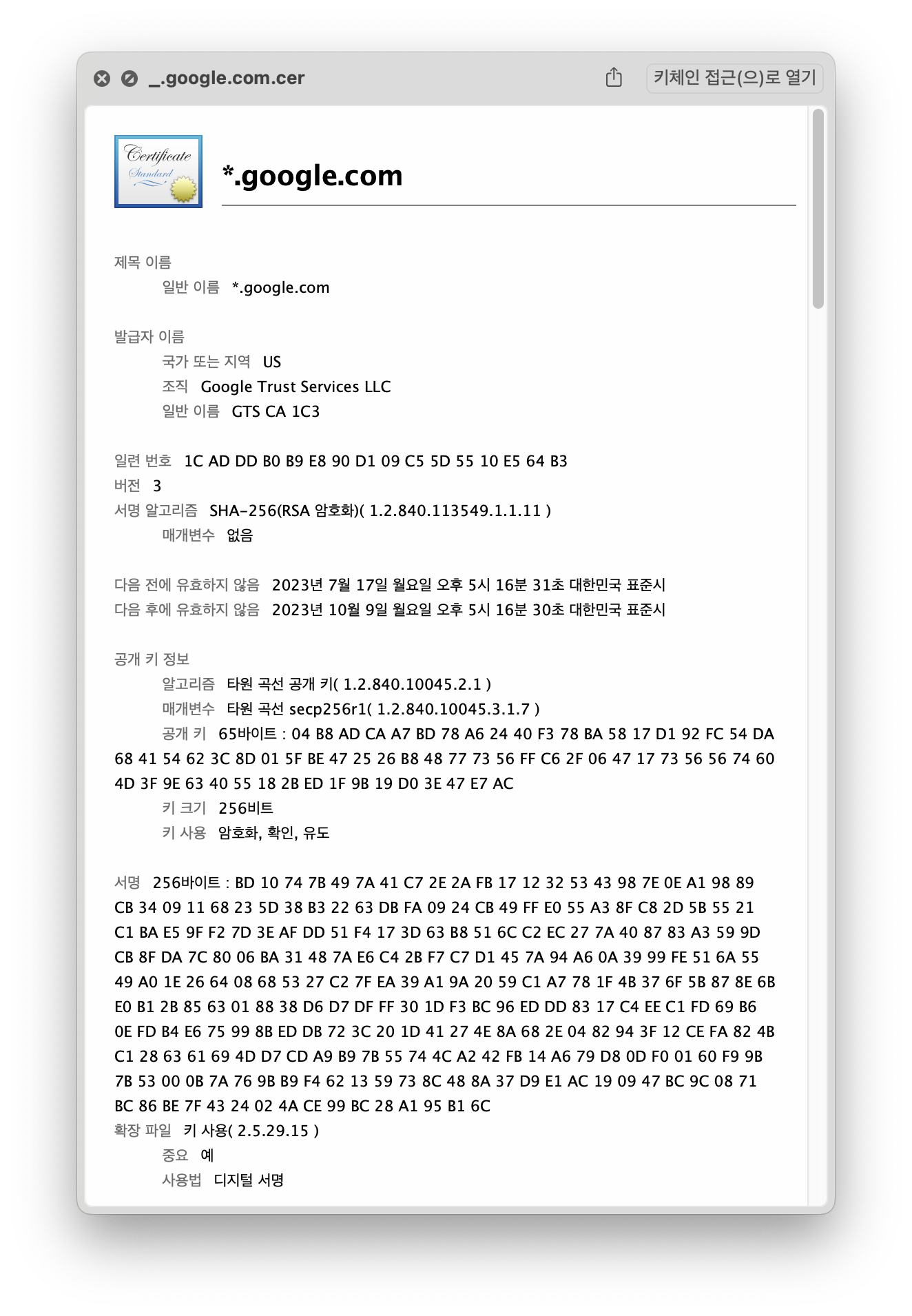
<p>이번에는 영희가 보낸 공개키가 정말 영희의 것인지 확신할 수 없다는 문제가 발생했습니다. 누군가 영희의 것이 맞는지 확인해 줄 필요가 있습니다. 그리고 그 누군가는 정말 아무나 신뢰할 수 있을만한 사람이어야 할 것입니다. 여기서는 대충 대통령으로 해봅시다. 한 나라의 대통령이 보증해주는 공개키라면 신뢰할 수 있지 않을까요? 여기서는 <strong>전자 서명(Digital Signature)</strong> 이라는 방법이 사용됩니다. (전자 서명에 대해서는 여기서 설명하지 않겠습니다.) 대통령은 대통령의 비밀키쌍을 가지고 있고, 공개키는 국민에게 공개되어있다고 해봅시다. 그리고 대통령이 비밀키로 '이 공개키는 영희의 공개키가 맞습니다' 라는 내용 및 공개키가 적힌 문서를 전자 서명하여 영희에게 주었다고 해봅시다. 위 3번 과정에서 영희는 공개키 대신 전자 서명된 문서를 철수에게 준다면 철수는 해당 문서를 대통령의 공개키를 이용해서 검증합니다. 이런 식으로 철수는 영희가 맞음을 확신할 수 있습니다.</p>
<img src="/assets/bottom-up-ssl-tls/image-20230813174113689.png" alt="">
<p>여기서 대통령이 서명해 준 문서를 <strong>인증서(Certificate)</strong> 라고 하고, 대통령 처럼 인증서를 발급해 주는 주체를 <strong>CA(Certificate Authority)</strong> 라고 합니다. 여기서 부터는 <a href="https://en.wikipedia.org/wiki/Chain_of_trust">신뢰의 체인 관계</a>가 형성됩니다. 영희의 공개키를 대통령이 보증해 줬다면, 대통령의 공개키는 누가 보증해 줄지에 대한 문제입니다. UN 같은 기관에서 대통령의 공개키를 보증해 주었다면, UN의 공개키는 누가 보증해 줄까요? 결국에는 최종적으로 신뢰할 수 있는 최상위 주체가 필요합니다. 이를 <strong>Root CA</strong> 라고 합니다.</p>
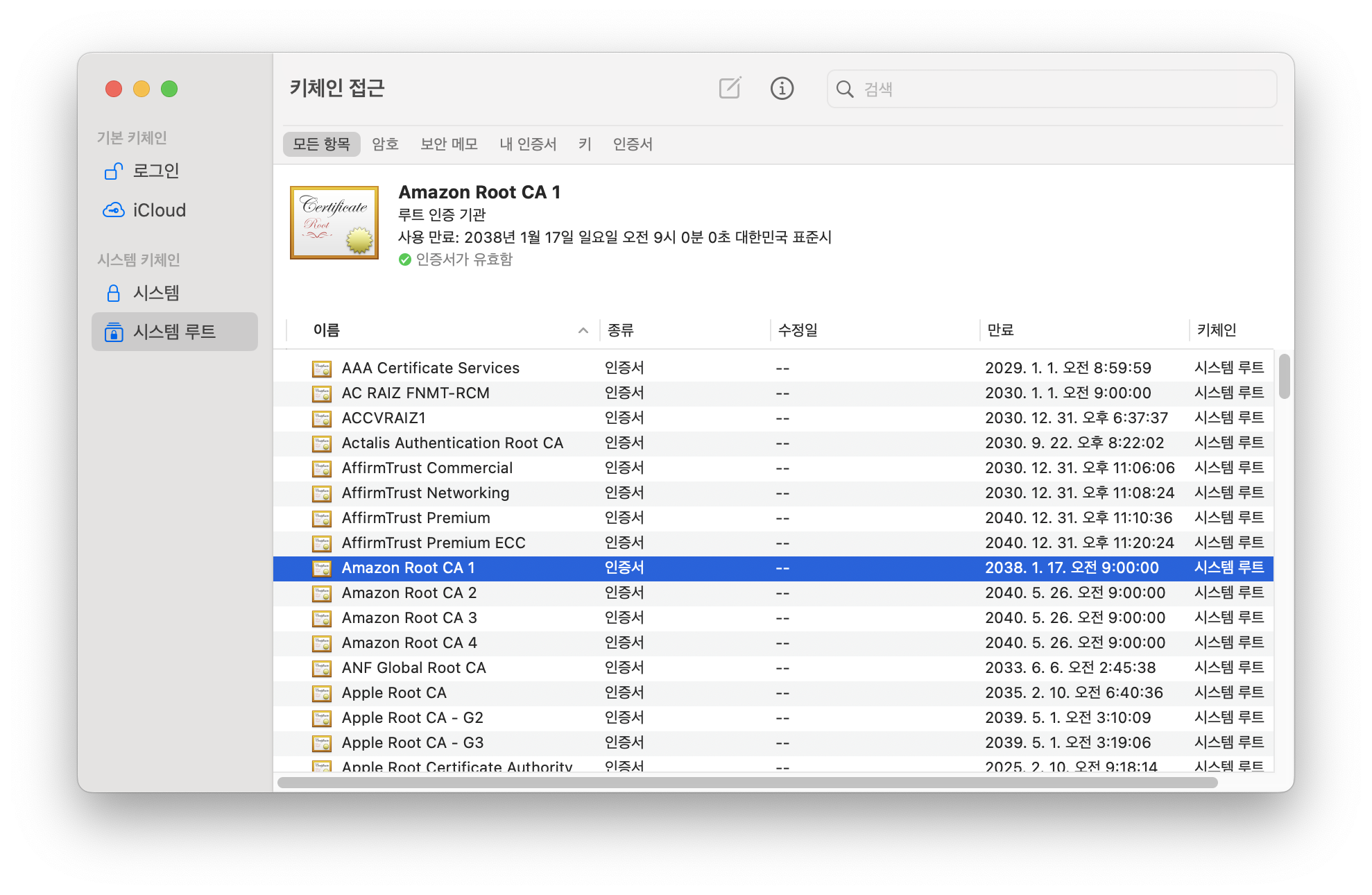
<img src="/assets/bottom-up-ssl-tls/image-20230813174136716.png" alt="">
<p>실제로 각 컴퓨터에는 위 사진처럼 미리 준비된 Root CA의 인증서들이 들어있습니다.</p>
<p>영희가 공개키를 보내는 것이 아니라 공개키 및 전자서명 정보가 담긴 인증서를 보내고, 철수가 이를 검증하는 과정을 추가해 봅시다.</p>
<blockquote>
<ol>
<li>철수는 영희에게 아무렇게 정한 값을 보낸다.</li>
<li>영희는 철수에게 아무렇게 정한 값을 보낸다.</li>
<li>영희는 철수에게 인증서를 보낸다.</li>
<li>철수는 영희가 보낸 인증서를 검증한다.</li>
<li>철수는 영희가 보낸 인증서 내의 공개키로 대칭키를 암호화하여 영희에게 보낸다.</li>
<li>영희는 비밀키로 대칭키를 복호화한다.</li>
<li>철수와 영희는 서로 가지고 있는 두 개의 값 및 대칭키를 이용해서 새로운 대칭키를 만든다.</li>
<li>철수는 편지를 새로 만든 대칭키로 암호화하여 영희에게 보낸다.</li>
<li>영희는 편지를 새로 만든 대칭키로 복호화한다.</li>
</ol>
</blockquote>
<p>물론, 이렇게 하더라도 여전히 제3자가 이 둘 사이를 방해할 방법은 존재합니다. 컴퓨터에 담긴 Root CA 인증서를 바꿔치기 한다거나, Root CA 인증서를 다운로드 받는 주소의 DNS를 교란시키는 등 다양합니다.</p>
<h2 id="참고-자료">참고 자료<a aria-hidden="true" tabindex="-1" href="#참고-자료"><span class="icon icon-link"></span></a></h2>
<ul>
<li><a href="https://ko.wikipedia.org/wiki/%EC%A0%84%EC%86%A1_%EA%B3%84%EC%B8%B5_%EB%B3%B4%EC%95%88">https://ko.wikipedia.org/wiki/전송_계층_보안</a></li>
<li><a href="https://en.wikipedia.org/wiki/Man-in-the-middle_attack">https://en.wikipedia.org/wiki/Man-in-the-middle_attack</a></li>
<li><a href="https://en.wikipedia.org/wiki/Replay_attack">https://en.wikipedia.org/wiki/Replay_attack</a></li>
<li><a href="https://www.enea.com/insights/a-new-way-of-detecting-tls-ssl-mitm-attacks/">https://www.enea.com/insights/a-new-way-of-detecting-tls-ssl-mitm-attacks/</a></li>
</ul>
<section data-footnotes="" class="footnotes"><h2 class="sr-only" id="footnote-label">각주<a aria-hidden="true" tabindex="-1" href="#footnote-label"><span class="icon icon-link"></span></a></h2>
<ol>
<li id="user-content-fn-stackexchange-1">
<p><a href="https://security.stackexchange.com/questions/218491/why-using-the-premaster-secret-directly-would-be-vulnerable-to-replay-attack">https://security.stackexchange.com/questions/218491/why-using-the-premaster-secret-directly-would-be-vulnerable-to-replay-attack</a> <a href="#user-content-fnref-stackexchange-1" data-footnote-backref="" class="data-footnote-backref" aria-label="본문으로 돌아가기">↩</a></p>
</li>
<li id="user-content-fn-stackexchange-2">
<p><a href="https://security.stackexchange.com/questions/89383/why-does-the-ssl-tls-handshake-have-a-client-and-server-random?rq=1">https://security.stackexchange.com/questions/89383/why-does-the-ssl-tls-handshake-have-a-client-and-server-random?rq=1</a> <a href="#user-content-fnref-stackexchange-2" data-footnote-backref="" class="data-footnote-backref" aria-label="본문으로 돌아가기">↩</a></p>
</li>
<li id="user-content-fn-ssl-korean-article-1">
<p><a href="https://opentutorials.org/course/228/4894">https://opentutorials.org/course/228/4894</a> <a href="#user-content-fnref-ssl-korean-article-1" data-footnote-backref="" class="data-footnote-backref" aria-label="본문으로 돌아가기">↩</a></p>
</li>
<li id="user-content-fn-ssl-korean-article-2">
<p><a href="https://rat2.tistory.com/5">https://rat2.tistory.com/5</a> <a href="#user-content-fnref-ssl-korean-article-2" data-footnote-backref="" class="data-footnote-backref" aria-label="본문으로 돌아가기">↩</a></p>
</li>
<li id="user-content-fn-ssl-korean-article-3">
<p><a href="https://goodgid.github.io/TLS-SSL/">https://goodgid.github.io/TLS-SSL/</a> <a href="#user-content-fnref-ssl-korean-article-3" data-footnote-backref="" class="data-footnote-backref" aria-label="본문으로 돌아가기">↩</a></p>
</li>
<li id="user-content-fn-ssl-korean-article-4">
<p><a href="https://juliecho.tistory.com/2">https://juliecho.tistory.com/2</a> <a href="#user-content-fnref-ssl-korean-article-4" data-footnote-backref="" class="data-footnote-backref" aria-label="본문으로 돌아가기">↩</a></p>
</li>
<li id="user-content-fn-ssl-english-article-1">
<p><a href="https://www.thesslstore.com/blog/explaining-ssl-handshake/">https://www.thesslstore.com/blog/explaining-ssl-handshake/</a> <a href="#user-content-fnref-ssl-english-article-1" data-footnote-backref="" class="data-footnote-backref" aria-label="본문으로 돌아가기">↩</a></p>
</li>
<li id="user-content-fn-ssl-english-article-2">
<p><a href="https://crypto.stackexchange.com/questions/27131/differences-between-the-terms-pre-master-secret-master-secret-private-key">https://crypto.stackexchange.com/questions/27131/differences-between-the-terms-pre-master-secret-master-secret-private-key</a> <a href="#user-content-fnref-ssl-english-article-2" data-footnote-backref="" class="data-footnote-backref" aria-label="본문으로 돌아가기">↩</a></p>
</li>
<li id="user-content-fn-ssl-english-article-3">
<p><a href="http://www.moserware.com/2009/06/first-few-milliseconds-of-https.html">http://www.moserware.com/2009/06/first-few-milliseconds-of-https.html</a> <a href="#user-content-fnref-ssl-english-article-3" data-footnote-backref="" class="data-footnote-backref" aria-label="본문으로 돌아가기">↩</a></p>
</li>
<li id="user-content-fn-ssl-english-article-4">
<p><a href="https://www.acunetix.com/blog/articles/establishing-tls-ssl-connection-part-5/">https://www.acunetix.com/blog/articles/establishing-tls-ssl-connection-part-5/</a> <a href="#user-content-fnref-ssl-english-article-4" data-footnote-backref="" class="data-footnote-backref" aria-label="본문으로 돌아가기">↩</a></p>
</li>
<li id="user-content-fn-ssl-english-article-5">
<p><a href="https://www.baeldung.com/cs/pre-master-shared-secret-private-public-key">https://www.baeldung.com/cs/pre-master-shared-secret-private-public-key</a> <a href="#user-content-fnref-ssl-english-article-5" data-footnote-backref="" class="data-footnote-backref" aria-label="본문으로 돌아가기">↩</a></p>
</li>
</ol>
</section>]]></content>
        <author>
            <name>Jisu Sim</name>
            <email>rlj1202@gmail.com</email>
            <uri>https://github.com/rlj1202</uri>
        </author>
    </entry>
    <entry>
        <title type="html"><![CDATA[백준 9359 - 서로소]]></title>
        <id>https://blog-ny4cromu1-rlj1202s-projects.vercel.app/articles/baekjoon-9359</id>
        <link href="https://blog-ny4cromu1-rlj1202s-projects.vercel.app/articles/baekjoon-9359"/>
        <updated>2022-10-22T20:01:00.000Z</updated>
        <content type="html"><![CDATA[<h2 id="문제">문제<a aria-hidden="true" tabindex="-1" href="#문제"><span class="icon icon-link"></span></a></h2>
<p>자연수 <span class="math math-inline"><span class="katex"><span class="katex-mathml"><math xmlns="http://www.w3.org/1998/Math/MathML"><semantics><mrow><mi>N</mi></mrow><annotation encoding="application/x-tex">N</annotation></semantics></math></span><span class="katex-html" aria-hidden="true"><span class="base"><span class="strut" style="height:0.6833em;"></span><span class="mord mathnormal" style="margin-right:0.10903em;">N</span></span></span></span></span>이 주어졌을 때, <span class="math math-inline"><span class="katex"><span class="katex-mathml"><math xmlns="http://www.w3.org/1998/Math/MathML"><semantics><mrow><mi>A</mi></mrow><annotation encoding="application/x-tex">A</annotation></semantics></math></span><span class="katex-html" aria-hidden="true"><span class="base"><span class="strut" style="height:0.6833em;"></span><span class="mord mathnormal">A</span></span></span></span></span>보다 크거나 같고, <span class="math math-inline"><span class="katex"><span class="katex-mathml"><math xmlns="http://www.w3.org/1998/Math/MathML"><semantics><mrow><mi>B</mi></mrow><annotation encoding="application/x-tex">B</annotation></semantics></math></span><span class="katex-html" aria-hidden="true"><span class="base"><span class="strut" style="height:0.6833em;"></span><span class="mord mathnormal" style="margin-right:0.05017em;">B</span></span></span></span></span>보다 작거나 같은 수 중에서 <span class="math math-inline"><span class="katex"><span class="katex-mathml"><math xmlns="http://www.w3.org/1998/Math/MathML"><semantics><mrow><mi>N</mi></mrow><annotation encoding="application/x-tex">N</annotation></semantics></math></span><span class="katex-html" aria-hidden="true"><span class="base"><span class="strut" style="height:0.6833em;"></span><span class="mord mathnormal" style="margin-right:0.10903em;">N</span></span></span></span></span>과 서로소인 것의 개수를 구하는 프로그램을 작성하시오.</p>
<p>두 정수를 나눌 수 있는 양의 정수가 <span class="math math-inline"><span class="katex"><span class="katex-mathml"><math xmlns="http://www.w3.org/1998/Math/MathML"><semantics><mrow><mn>1</mn></mrow><annotation encoding="application/x-tex">1</annotation></semantics></math></span><span class="katex-html" aria-hidden="true"><span class="base"><span class="strut" style="height:0.6444em;"></span><span class="mord">1</span></span></span></span></span>밖에 없을 때, 두 정수를 서로소라고 한다. 즉, 두 수의 최대공약수가 <span class="math math-inline"><span class="katex"><span class="katex-mathml"><math xmlns="http://www.w3.org/1998/Math/MathML"><semantics><mrow><mn>1</mn></mrow><annotation encoding="application/x-tex">1</annotation></semantics></math></span><span class="katex-html" aria-hidden="true"><span class="base"><span class="strut" style="height:0.6444em;"></span><span class="mord">1</span></span></span></span></span>이면 서로소이다. <span class="math math-inline"><span class="katex"><span class="katex-mathml"><math xmlns="http://www.w3.org/1998/Math/MathML"><semantics><mrow><mn>1</mn></mrow><annotation encoding="application/x-tex">1</annotation></semantics></math></span><span class="katex-html" aria-hidden="true"><span class="base"><span class="strut" style="height:0.6444em;"></span><span class="mord">1</span></span></span></span></span>은 모든 정수와 서로소이다.</p>
<h2 id="풀이">풀이<a aria-hidden="true" tabindex="-1" href="#풀이"><span class="icon icon-link"></span></a></h2>
<p><span class="math math-inline"><span class="katex"><span class="katex-mathml"><math xmlns="http://www.w3.org/1998/Math/MathML"><semantics><mrow><mo stretchy="false">[</mo><mi>A</mi><mo separator="true">,</mo><mi>B</mi><mo stretchy="false">]</mo></mrow><annotation encoding="application/x-tex">[A, B]</annotation></semantics></math></span><span class="katex-html" aria-hidden="true"><span class="base"><span class="strut" style="height:1em;vertical-align:-0.25em;"></span><span class="mopen">[</span><span class="mord mathnormal">A</span><span class="mpunct">,</span><span class="mspace" style="margin-right:0.1667em;"></span><span class="mord mathnormal" style="margin-right:0.05017em;">B</span><span class="mclose">]</span></span></span></span></span>에서 <span class="math math-inline"><span class="katex"><span class="katex-mathml"><math xmlns="http://www.w3.org/1998/Math/MathML"><semantics><mrow><mi>N</mi></mrow><annotation encoding="application/x-tex">N</annotation></semantics></math></span><span class="katex-html" aria-hidden="true"><span class="base"><span class="strut" style="height:0.6833em;"></span><span class="mord mathnormal" style="margin-right:0.10903em;">N</span></span></span></span></span>과 서로소인 것의 갯수는 전체 개수에서 서로소인 것의 개수를 빼주면 된다.
<span class="math math-inline"><span class="katex"><span class="katex-mathml"><math xmlns="http://www.w3.org/1998/Math/MathML"><semantics><mrow><mi>N</mi></mrow><annotation encoding="application/x-tex">N</annotation></semantics></math></span><span class="katex-html" aria-hidden="true"><span class="base"><span class="strut" style="height:0.6833em;"></span><span class="mord mathnormal" style="margin-right:0.10903em;">N</span></span></span></span></span>과 서로소인 것은 <span class="math math-inline"><span class="katex"><span class="katex-mathml"><math xmlns="http://www.w3.org/1998/Math/MathML"><semantics><mrow><mi>N</mi></mrow><annotation encoding="application/x-tex">N</annotation></semantics></math></span><span class="katex-html" aria-hidden="true"><span class="base"><span class="strut" style="height:0.6833em;"></span><span class="mord mathnormal" style="margin-right:0.10903em;">N</span></span></span></span></span>의 소인수 중 하나의 배수이면 된다.</p>
<p>N의 소인수를 <span class="math math-inline"><span class="katex"><span class="katex-mathml"><math xmlns="http://www.w3.org/1998/Math/MathML"><semantics><mrow><msub><mi>p</mi><mn>1</mn></msub><mo separator="true">,</mo><msub><mi>p</mi><mn>2</mn></msub><mo separator="true">,</mo><msub><mi>p</mi><mn>3</mn></msub><mo separator="true">,</mo><mo>⋯</mo><mtext> </mtext><mo separator="true">,</mo><msub><mi>p</mi><mi>k</mi></msub></mrow><annotation encoding="application/x-tex">p_1, p_2, p_3, \cdots, p_k</annotation></semantics></math></span><span class="katex-html" aria-hidden="true"><span class="base"><span class="strut" style="height:0.625em;vertical-align:-0.1944em;"></span><span class="mord"><span class="mord mathnormal">p</span><span class="msupsub"><span class="vlist-t vlist-t2"><span class="vlist-r"><span class="vlist" style="height:0.3011em;"><span style="top:-2.55em;margin-left:0em;margin-right:0.05em;"><span class="pstrut" style="height:2.7em;"></span><span class="sizing reset-size6 size3 mtight"><span class="mord mtight">1</span></span></span></span><span class="vlist-s">​</span></span><span class="vlist-r"><span class="vlist" style="height:0.15em;"><span></span></span></span></span></span></span><span class="mpunct">,</span><span class="mspace" style="margin-right:0.1667em;"></span><span class="mord"><span class="mord mathnormal">p</span><span class="msupsub"><span class="vlist-t vlist-t2"><span class="vlist-r"><span class="vlist" style="height:0.3011em;"><span style="top:-2.55em;margin-left:0em;margin-right:0.05em;"><span class="pstrut" style="height:2.7em;"></span><span class="sizing reset-size6 size3 mtight"><span class="mord mtight">2</span></span></span></span><span class="vlist-s">​</span></span><span class="vlist-r"><span class="vlist" style="height:0.15em;"><span></span></span></span></span></span></span><span class="mpunct">,</span><span class="mspace" style="margin-right:0.1667em;"></span><span class="mord"><span class="mord mathnormal">p</span><span class="msupsub"><span class="vlist-t vlist-t2"><span class="vlist-r"><span class="vlist" style="height:0.3011em;"><span style="top:-2.55em;margin-left:0em;margin-right:0.05em;"><span class="pstrut" style="height:2.7em;"></span><span class="sizing reset-size6 size3 mtight"><span class="mord mtight">3</span></span></span></span><span class="vlist-s">​</span></span><span class="vlist-r"><span class="vlist" style="height:0.15em;"><span></span></span></span></span></span></span><span class="mpunct">,</span><span class="mspace" style="margin-right:0.1667em;"></span><span class="minner">⋯</span><span class="mspace" style="margin-right:0.1667em;"></span><span class="mspace" style="margin-right:0.1667em;"></span><span class="mpunct">,</span><span class="mspace" style="margin-right:0.1667em;"></span><span class="mord"><span class="mord mathnormal">p</span><span class="msupsub"><span class="vlist-t vlist-t2"><span class="vlist-r"><span class="vlist" style="height:0.3361em;"><span style="top:-2.55em;margin-left:0em;margin-right:0.05em;"><span class="pstrut" style="height:2.7em;"></span><span class="sizing reset-size6 size3 mtight"><span class="mord mathnormal mtight" style="margin-right:0.03148em;">k</span></span></span></span><span class="vlist-s">​</span></span><span class="vlist-r"><span class="vlist" style="height:0.15em;"><span></span></span></span></span></span></span></span></span></span></span>라고 할 때</p>
<div class="math math-display"><span class="katex-display"><span class="katex"><span class="katex-mathml"><math xmlns="http://www.w3.org/1998/Math/MathML" display="block"><semantics><mrow><msub><mi>X</mi><msub><mi>p</mi><mi>i</mi></msub></msub><mo>=</mo><mo stretchy="false">[</mo><mi>A</mi><mo separator="true">,</mo><mi>B</mi><mo stretchy="false">]</mo><mtext>에서 </mtext><msub><mi>p</mi><mi>i</mi></msub><mtext>의배수인 숫자의 집합</mtext></mrow><annotation encoding="application/x-tex">X_{p_i} = [A, B]에서\ p_i의 배수인\ 숫자의\ 집합</annotation></semantics></math></span><span class="katex-html" aria-hidden="true"><span class="base"><span class="strut" style="height:0.9694em;vertical-align:-0.2861em;"></span><span class="mord"><span class="mord mathnormal" style="margin-right:0.07847em;">X</span><span class="msupsub"><span class="vlist-t vlist-t2"><span class="vlist-r"><span class="vlist" style="height:0.1514em;"><span style="top:-2.55em;margin-left:-0.0785em;margin-right:0.05em;"><span class="pstrut" style="height:2.7em;"></span><span class="sizing reset-size6 size3 mtight"><span class="mord mtight"><span class="mord mtight"><span class="mord mathnormal mtight">p</span><span class="msupsub"><span class="vlist-t vlist-t2"><span class="vlist-r"><span class="vlist" style="height:0.3281em;"><span style="top:-2.357em;margin-left:0em;margin-right:0.0714em;"><span class="pstrut" style="height:2.5em;"></span><span class="sizing reset-size3 size1 mtight"><span class="mord mathnormal mtight">i</span></span></span></span><span class="vlist-s">​</span></span><span class="vlist-r"><span class="vlist" style="height:0.143em;"><span></span></span></span></span></span></span></span></span></span></span><span class="vlist-s">​</span></span><span class="vlist-r"><span class="vlist" style="height:0.2861em;"><span></span></span></span></span></span></span><span class="mspace" style="margin-right:0.2778em;"></span><span class="mrel">=</span><span class="mspace" style="margin-right:0.2778em;"></span></span><span class="base"><span class="strut" style="height:1em;vertical-align:-0.25em;"></span><span class="mopen">[</span><span class="mord mathnormal">A</span><span class="mpunct">,</span><span class="mspace" style="margin-right:0.1667em;"></span><span class="mord mathnormal" style="margin-right:0.05017em;">B</span><span class="mclose">]</span><span class="mord hangul_fallback">에서</span><span class="mspace"> </span><span class="mord"><span class="mord mathnormal">p</span><span class="msupsub"><span class="vlist-t vlist-t2"><span class="vlist-r"><span class="vlist" style="height:0.3117em;"><span style="top:-2.55em;margin-left:0em;margin-right:0.05em;"><span class="pstrut" style="height:2.7em;"></span><span class="sizing reset-size6 size3 mtight"><span class="mord mathnormal mtight">i</span></span></span></span><span class="vlist-s">​</span></span><span class="vlist-r"><span class="vlist" style="height:0.15em;"><span></span></span></span></span></span></span><span class="mord hangul_fallback">의배수인</span><span class="mspace"> </span><span class="mord hangul_fallback">숫자의</span><span class="mspace"> </span><span class="mord hangul_fallback">집합</span></span></span></span></span></div>
<p>라고 한다면 포함 배제의 원리를 이용해서 다음과 같이 풀어 쓸 수 있다.</p>
<div class="math math-display"><span class="katex-display"><span class="katex"><span class="katex-mathml"><math xmlns="http://www.w3.org/1998/Math/MathML" display="block"><semantics><mtable rowspacing="0.25em" columnalign="right left" columnspacing="0em"><mtr><mtd><mstyle scriptlevel="0" displaystyle="true"><mrow></mrow></mstyle></mtd><mtd><mstyle scriptlevel="0" displaystyle="true"><mrow><mrow></mrow><mi mathvariant="normal">n</mi><mo stretchy="false">(</mo><msub><mi>X</mi><msub><mi>p</mi><mn>1</mn></msub></msub><mo>∪</mo><msub><mi>X</mi><msub><mi>p</mi><mn>2</mn></msub></msub><mo>∪</mo><mo>⋯</mo><mo>∪</mo><msub><mi>X</mi><msub><mi>p</mi><mi>k</mi></msub></msub><mo stretchy="false">)</mo><mo>=</mo></mrow></mstyle></mtd></mtr><mtr><mtd><mstyle scriptlevel="0" displaystyle="true"><mrow></mrow></mstyle></mtd><mtd><mstyle scriptlevel="0" displaystyle="true"><mrow><mrow></mrow><mo>+</mo><mi mathvariant="normal">n</mi><mo stretchy="false">(</mo><msub><mi>X</mi><msub><mi>p</mi><mn>1</mn></msub></msub><mo stretchy="false">)</mo><mo>+</mo><mi mathvariant="normal">n</mi><mo stretchy="false">(</mo><msub><mi>X</mi><msub><mi>p</mi><mn>2</mn></msub></msub><mo stretchy="false">)</mo><mo>+</mo><mo>⋯</mo></mrow></mstyle></mtd></mtr><mtr><mtd><mstyle scriptlevel="0" displaystyle="true"><mrow></mrow></mstyle></mtd><mtd><mstyle scriptlevel="0" displaystyle="true"><mrow><mrow></mrow><mo>−</mo><mi mathvariant="normal">n</mi><mo stretchy="false">(</mo><msub><mi>X</mi><msub><mi>p</mi><mn>1</mn></msub></msub><mo>∩</mo><msub><mi>X</mi><msub><mi>p</mi><mn>2</mn></msub></msub><mo stretchy="false">)</mo><mo>−</mo><mi mathvariant="normal">n</mi><mo stretchy="false">(</mo><msub><mi>X</mi><msub><mi>p</mi><mn>1</mn></msub></msub><mo>∩</mo><msub><mi>X</mi><msub><mi>p</mi><mn>3</mn></msub></msub><mo stretchy="false">)</mo><mo>−</mo><mo>⋯</mo></mrow></mstyle></mtd></mtr><mtr><mtd><mstyle scriptlevel="0" displaystyle="true"><mrow></mrow></mstyle></mtd><mtd><mstyle scriptlevel="0" displaystyle="true"><mrow><mrow></mrow><mo>+</mo><mi mathvariant="normal">n</mi><mo stretchy="false">(</mo><msub><mi>X</mi><msub><mi>p</mi><mn>1</mn></msub></msub><mo>∩</mo><msub><mi>X</mi><msub><mi>p</mi><mn>2</mn></msub></msub><mo>∩</mo><msub><mi>X</mi><msub><mi>p</mi><mn>3</mn></msub></msub><mo stretchy="false">)</mo><mo>+</mo><mo>⋯</mo></mrow></mstyle></mtd></mtr></mtable><annotation encoding="application/x-tex">\begin{aligned}
&#x26; \mathrm{n}(X_{p_1} \cup X_{p_2} \cup \cdots \cup X_{p_k}) = \\
&#x26; + \mathrm{n}(X_{p_1}) + \mathrm{n}(X_{p_2}) + \cdots \\
&#x26; - \mathrm{n}(X_{p_1} \cap X_{p_2}) - \mathrm{n}(X_{p_1} \cap X_{p_3}) - \cdots \\
&#x26; + \mathrm{n}(X_{p_1} \cap X_{p_2} \cap X_{p_3}) + \cdots
\end{aligned}</annotation></semantics></math></span><span class="katex-html" aria-hidden="true"><span class="base"><span class="strut" style="height:6em;vertical-align:-2.75em;"></span><span class="mord"><span class="mtable"><span class="col-align-r"><span class="vlist-t vlist-t2"><span class="vlist-r"><span class="vlist" style="height:3.25em;"><span style="top:-5.25em;"><span class="pstrut" style="height:2.84em;"></span><span class="mord"></span></span><span style="top:-3.75em;"><span class="pstrut" style="height:2.84em;"></span><span class="mord"></span></span><span style="top:-2.25em;"><span class="pstrut" style="height:2.84em;"></span><span class="mord"></span></span><span style="top:-0.75em;"><span class="pstrut" style="height:2.84em;"></span><span class="mord"></span></span></span><span class="vlist-s">​</span></span><span class="vlist-r"><span class="vlist" style="height:2.75em;"><span></span></span></span></span></span><span class="col-align-l"><span class="vlist-t vlist-t2"><span class="vlist-r"><span class="vlist" style="height:3.25em;"><span style="top:-5.41em;"><span class="pstrut" style="height:3em;"></span><span class="mord"><span class="mord"></span><span class="mord mathrm">n</span><span class="mopen">(</span><span class="mord"><span class="mord mathnormal" style="margin-right:0.07847em;">X</span><span class="msupsub"><span class="vlist-t vlist-t2"><span class="vlist-r"><span class="vlist" style="height:0.1514em;"><span style="top:-2.55em;margin-left:-0.0785em;margin-right:0.05em;"><span class="pstrut" style="height:2.7em;"></span><span class="sizing reset-size6 size3 mtight"><span class="mord mtight"><span class="mord mtight"><span class="mord mathnormal mtight">p</span><span class="msupsub"><span class="vlist-t vlist-t2"><span class="vlist-r"><span class="vlist" style="height:0.3173em;"><span style="top:-2.357em;margin-left:0em;margin-right:0.0714em;"><span class="pstrut" style="height:2.5em;"></span><span class="sizing reset-size3 size1 mtight"><span class="mord mtight">1</span></span></span></span><span class="vlist-s">​</span></span><span class="vlist-r"><span class="vlist" style="height:0.143em;"><span></span></span></span></span></span></span></span></span></span></span><span class="vlist-s">​</span></span><span class="vlist-r"><span class="vlist" style="height:0.2861em;"><span></span></span></span></span></span></span><span class="mspace" style="margin-right:0.2222em;"></span><span class="mbin">∪</span><span class="mspace" style="margin-right:0.2222em;"></span><span class="mord"><span class="mord mathnormal" style="margin-right:0.07847em;">X</span><span class="msupsub"><span class="vlist-t vlist-t2"><span class="vlist-r"><span class="vlist" style="height:0.1514em;"><span style="top:-2.55em;margin-left:-0.0785em;margin-right:0.05em;"><span class="pstrut" style="height:2.7em;"></span><span class="sizing reset-size6 size3 mtight"><span class="mord mtight"><span class="mord mtight"><span class="mord mathnormal mtight">p</span><span class="msupsub"><span class="vlist-t vlist-t2"><span class="vlist-r"><span class="vlist" style="height:0.3173em;"><span style="top:-2.357em;margin-left:0em;margin-right:0.0714em;"><span class="pstrut" style="height:2.5em;"></span><span class="sizing reset-size3 size1 mtight"><span class="mord mtight">2</span></span></span></span><span class="vlist-s">​</span></span><span class="vlist-r"><span class="vlist" style="height:0.143em;"><span></span></span></span></span></span></span></span></span></span></span><span class="vlist-s">​</span></span><span class="vlist-r"><span class="vlist" style="height:0.2861em;"><span></span></span></span></span></span></span><span class="mspace" style="margin-right:0.2222em;"></span><span class="mbin">∪</span><span class="mspace" style="margin-right:0.2222em;"></span><span class="minner">⋯</span><span class="mspace" style="margin-right:0.2222em;"></span><span class="mbin">∪</span><span class="mspace" style="margin-right:0.2222em;"></span><span class="mord"><span class="mord mathnormal" style="margin-right:0.07847em;">X</span><span class="msupsub"><span class="vlist-t vlist-t2"><span class="vlist-r"><span class="vlist" style="height:0.1514em;"><span style="top:-2.55em;margin-left:-0.0785em;margin-right:0.05em;"><span class="pstrut" style="height:2.7em;"></span><span class="sizing reset-size6 size3 mtight"><span class="mord mtight"><span class="mord mtight"><span class="mord mathnormal mtight">p</span><span class="msupsub"><span class="vlist-t vlist-t2"><span class="vlist-r"><span class="vlist" style="height:0.3448em;"><span style="top:-2.3488em;margin-left:0em;margin-right:0.0714em;"><span class="pstrut" style="height:2.5em;"></span><span class="sizing reset-size3 size1 mtight"><span class="mord mathnormal mtight" style="margin-right:0.03148em;">k</span></span></span></span><span class="vlist-s">​</span></span><span class="vlist-r"><span class="vlist" style="height:0.1512em;"><span></span></span></span></span></span></span></span></span></span></span><span class="vlist-s">​</span></span><span class="vlist-r"><span class="vlist" style="height:0.2861em;"><span></span></span></span></span></span></span><span class="mclose">)</span><span class="mspace" style="margin-right:0.2778em;"></span><span class="mrel">=</span></span></span><span style="top:-3.91em;"><span class="pstrut" style="height:3em;"></span><span class="mord"><span class="mord"></span><span class="mspace" style="margin-right:0.2222em;"></span><span class="mbin">+</span><span class="mspace" style="margin-right:0.2222em;"></span><span class="mord mathrm">n</span><span class="mopen">(</span><span class="mord"><span class="mord mathnormal" style="margin-right:0.07847em;">X</span><span class="msupsub"><span class="vlist-t vlist-t2"><span class="vlist-r"><span class="vlist" style="height:0.1514em;"><span style="top:-2.55em;margin-left:-0.0785em;margin-right:0.05em;"><span class="pstrut" style="height:2.7em;"></span><span class="sizing reset-size6 size3 mtight"><span class="mord mtight"><span class="mord mtight"><span class="mord mathnormal mtight">p</span><span class="msupsub"><span class="vlist-t vlist-t2"><span class="vlist-r"><span class="vlist" style="height:0.3173em;"><span style="top:-2.357em;margin-left:0em;margin-right:0.0714em;"><span class="pstrut" style="height:2.5em;"></span><span class="sizing reset-size3 size1 mtight"><span class="mord mtight">1</span></span></span></span><span class="vlist-s">​</span></span><span class="vlist-r"><span class="vlist" style="height:0.143em;"><span></span></span></span></span></span></span></span></span></span></span><span class="vlist-s">​</span></span><span class="vlist-r"><span class="vlist" style="height:0.2861em;"><span></span></span></span></span></span></span><span class="mclose">)</span><span class="mspace" style="margin-right:0.2222em;"></span><span class="mbin">+</span><span class="mspace" style="margin-right:0.2222em;"></span><span class="mord mathrm">n</span><span class="mopen">(</span><span class="mord"><span class="mord mathnormal" style="margin-right:0.07847em;">X</span><span class="msupsub"><span class="vlist-t vlist-t2"><span class="vlist-r"><span class="vlist" style="height:0.1514em;"><span style="top:-2.55em;margin-left:-0.0785em;margin-right:0.05em;"><span class="pstrut" style="height:2.7em;"></span><span class="sizing reset-size6 size3 mtight"><span class="mord mtight"><span class="mord mtight"><span class="mord mathnormal mtight">p</span><span class="msupsub"><span class="vlist-t vlist-t2"><span class="vlist-r"><span class="vlist" style="height:0.3173em;"><span style="top:-2.357em;margin-left:0em;margin-right:0.0714em;"><span class="pstrut" style="height:2.5em;"></span><span class="sizing reset-size3 size1 mtight"><span class="mord mtight">2</span></span></span></span><span class="vlist-s">​</span></span><span class="vlist-r"><span class="vlist" style="height:0.143em;"><span></span></span></span></span></span></span></span></span></span></span><span class="vlist-s">​</span></span><span class="vlist-r"><span class="vlist" style="height:0.2861em;"><span></span></span></span></span></span></span><span class="mclose">)</span><span class="mspace" style="margin-right:0.2222em;"></span><span class="mbin">+</span><span class="mspace" style="margin-right:0.2222em;"></span><span class="minner">⋯</span></span></span><span style="top:-2.41em;"><span class="pstrut" style="height:3em;"></span><span class="mord"><span class="mord"></span><span class="mspace" style="margin-right:0.2222em;"></span><span class="mbin">−</span><span class="mspace" style="margin-right:0.2222em;"></span><span class="mord mathrm">n</span><span class="mopen">(</span><span class="mord"><span class="mord mathnormal" style="margin-right:0.07847em;">X</span><span class="msupsub"><span class="vlist-t vlist-t2"><span class="vlist-r"><span class="vlist" style="height:0.1514em;"><span style="top:-2.55em;margin-left:-0.0785em;margin-right:0.05em;"><span class="pstrut" style="height:2.7em;"></span><span class="sizing reset-size6 size3 mtight"><span class="mord mtight"><span class="mord mtight"><span class="mord mathnormal mtight">p</span><span class="msupsub"><span class="vlist-t vlist-t2"><span class="vlist-r"><span class="vlist" style="height:0.3173em;"><span style="top:-2.357em;margin-left:0em;margin-right:0.0714em;"><span class="pstrut" style="height:2.5em;"></span><span class="sizing reset-size3 size1 mtight"><span class="mord mtight">1</span></span></span></span><span class="vlist-s">​</span></span><span class="vlist-r"><span class="vlist" style="height:0.143em;"><span></span></span></span></span></span></span></span></span></span></span><span class="vlist-s">​</span></span><span class="vlist-r"><span class="vlist" style="height:0.2861em;"><span></span></span></span></span></span></span><span class="mspace" style="margin-right:0.2222em;"></span><span class="mbin">∩</span><span class="mspace" style="margin-right:0.2222em;"></span><span class="mord"><span class="mord mathnormal" style="margin-right:0.07847em;">X</span><span class="msupsub"><span class="vlist-t vlist-t2"><span class="vlist-r"><span class="vlist" style="height:0.1514em;"><span style="top:-2.55em;margin-left:-0.0785em;margin-right:0.05em;"><span class="pstrut" style="height:2.7em;"></span><span class="sizing reset-size6 size3 mtight"><span class="mord mtight"><span class="mord mtight"><span class="mord mathnormal mtight">p</span><span class="msupsub"><span class="vlist-t vlist-t2"><span class="vlist-r"><span class="vlist" style="height:0.3173em;"><span style="top:-2.357em;margin-left:0em;margin-right:0.0714em;"><span class="pstrut" style="height:2.5em;"></span><span class="sizing reset-size3 size1 mtight"><span class="mord mtight">2</span></span></span></span><span class="vlist-s">​</span></span><span class="vlist-r"><span class="vlist" style="height:0.143em;"><span></span></span></span></span></span></span></span></span></span></span><span class="vlist-s">​</span></span><span class="vlist-r"><span class="vlist" style="height:0.2861em;"><span></span></span></span></span></span></span><span class="mclose">)</span><span class="mspace" style="margin-right:0.2222em;"></span><span class="mbin">−</span><span class="mspace" style="margin-right:0.2222em;"></span><span class="mord mathrm">n</span><span class="mopen">(</span><span class="mord"><span class="mord mathnormal" style="margin-right:0.07847em;">X</span><span class="msupsub"><span class="vlist-t vlist-t2"><span class="vlist-r"><span class="vlist" style="height:0.1514em;"><span style="top:-2.55em;margin-left:-0.0785em;margin-right:0.05em;"><span class="pstrut" style="height:2.7em;"></span><span class="sizing reset-size6 size3 mtight"><span class="mord mtight"><span class="mord mtight"><span class="mord mathnormal mtight">p</span><span class="msupsub"><span class="vlist-t vlist-t2"><span class="vlist-r"><span class="vlist" style="height:0.3173em;"><span style="top:-2.357em;margin-left:0em;margin-right:0.0714em;"><span class="pstrut" style="height:2.5em;"></span><span class="sizing reset-size3 size1 mtight"><span class="mord mtight">1</span></span></span></span><span class="vlist-s">​</span></span><span class="vlist-r"><span class="vlist" style="height:0.143em;"><span></span></span></span></span></span></span></span></span></span></span><span class="vlist-s">​</span></span><span class="vlist-r"><span class="vlist" style="height:0.2861em;"><span></span></span></span></span></span></span><span class="mspace" style="margin-right:0.2222em;"></span><span class="mbin">∩</span><span class="mspace" style="margin-right:0.2222em;"></span><span class="mord"><span class="mord mathnormal" style="margin-right:0.07847em;">X</span><span class="msupsub"><span class="vlist-t vlist-t2"><span class="vlist-r"><span class="vlist" style="height:0.1514em;"><span style="top:-2.55em;margin-left:-0.0785em;margin-right:0.05em;"><span class="pstrut" style="height:2.7em;"></span><span class="sizing reset-size6 size3 mtight"><span class="mord mtight"><span class="mord mtight"><span class="mord mathnormal mtight">p</span><span class="msupsub"><span class="vlist-t vlist-t2"><span class="vlist-r"><span class="vlist" style="height:0.3173em;"><span style="top:-2.357em;margin-left:0em;margin-right:0.0714em;"><span class="pstrut" style="height:2.5em;"></span><span class="sizing reset-size3 size1 mtight"><span class="mord mtight">3</span></span></span></span><span class="vlist-s">​</span></span><span class="vlist-r"><span class="vlist" style="height:0.143em;"><span></span></span></span></span></span></span></span></span></span></span><span class="vlist-s">​</span></span><span class="vlist-r"><span class="vlist" style="height:0.2861em;"><span></span></span></span></span></span></span><span class="mclose">)</span><span class="mspace" style="margin-right:0.2222em;"></span><span class="mbin">−</span><span class="mspace" style="margin-right:0.2222em;"></span><span class="minner">⋯</span></span></span><span style="top:-0.91em;"><span class="pstrut" style="height:3em;"></span><span class="mord"><span class="mord"></span><span class="mspace" style="margin-right:0.2222em;"></span><span class="mbin">+</span><span class="mspace" style="margin-right:0.2222em;"></span><span class="mord mathrm">n</span><span class="mopen">(</span><span class="mord"><span class="mord mathnormal" style="margin-right:0.07847em;">X</span><span class="msupsub"><span class="vlist-t vlist-t2"><span class="vlist-r"><span class="vlist" style="height:0.1514em;"><span style="top:-2.55em;margin-left:-0.0785em;margin-right:0.05em;"><span class="pstrut" style="height:2.7em;"></span><span class="sizing reset-size6 size3 mtight"><span class="mord mtight"><span class="mord mtight"><span class="mord mathnormal mtight">p</span><span class="msupsub"><span class="vlist-t vlist-t2"><span class="vlist-r"><span class="vlist" style="height:0.3173em;"><span style="top:-2.357em;margin-left:0em;margin-right:0.0714em;"><span class="pstrut" style="height:2.5em;"></span><span class="sizing reset-size3 size1 mtight"><span class="mord mtight">1</span></span></span></span><span class="vlist-s">​</span></span><span class="vlist-r"><span class="vlist" style="height:0.143em;"><span></span></span></span></span></span></span></span></span></span></span><span class="vlist-s">​</span></span><span class="vlist-r"><span class="vlist" style="height:0.2861em;"><span></span></span></span></span></span></span><span class="mspace" style="margin-right:0.2222em;"></span><span class="mbin">∩</span><span class="mspace" style="margin-right:0.2222em;"></span><span class="mord"><span class="mord mathnormal" style="margin-right:0.07847em;">X</span><span class="msupsub"><span class="vlist-t vlist-t2"><span class="vlist-r"><span class="vlist" style="height:0.1514em;"><span style="top:-2.55em;margin-left:-0.0785em;margin-right:0.05em;"><span class="pstrut" style="height:2.7em;"></span><span class="sizing reset-size6 size3 mtight"><span class="mord mtight"><span class="mord mtight"><span class="mord mathnormal mtight">p</span><span class="msupsub"><span class="vlist-t vlist-t2"><span class="vlist-r"><span class="vlist" style="height:0.3173em;"><span style="top:-2.357em;margin-left:0em;margin-right:0.0714em;"><span class="pstrut" style="height:2.5em;"></span><span class="sizing reset-size3 size1 mtight"><span class="mord mtight">2</span></span></span></span><span class="vlist-s">​</span></span><span class="vlist-r"><span class="vlist" style="height:0.143em;"><span></span></span></span></span></span></span></span></span></span></span><span class="vlist-s">​</span></span><span class="vlist-r"><span class="vlist" style="height:0.2861em;"><span></span></span></span></span></span></span><span class="mspace" style="margin-right:0.2222em;"></span><span class="mbin">∩</span><span class="mspace" style="margin-right:0.2222em;"></span><span class="mord"><span class="mord mathnormal" style="margin-right:0.07847em;">X</span><span class="msupsub"><span class="vlist-t vlist-t2"><span class="vlist-r"><span class="vlist" style="height:0.1514em;"><span style="top:-2.55em;margin-left:-0.0785em;margin-right:0.05em;"><span class="pstrut" style="height:2.7em;"></span><span class="sizing reset-size6 size3 mtight"><span class="mord mtight"><span class="mord mtight"><span class="mord mathnormal mtight">p</span><span class="msupsub"><span class="vlist-t vlist-t2"><span class="vlist-r"><span class="vlist" style="height:0.3173em;"><span style="top:-2.357em;margin-left:0em;margin-right:0.0714em;"><span class="pstrut" style="height:2.5em;"></span><span class="sizing reset-size3 size1 mtight"><span class="mord mtight">3</span></span></span></span><span class="vlist-s">​</span></span><span class="vlist-r"><span class="vlist" style="height:0.143em;"><span></span></span></span></span></span></span></span></span></span></span><span class="vlist-s">​</span></span><span class="vlist-r"><span class="vlist" style="height:0.2861em;"><span></span></span></span></span></span></span><span class="mclose">)</span><span class="mspace" style="margin-right:0.2222em;"></span><span class="mbin">+</span><span class="mspace" style="margin-right:0.2222em;"></span><span class="minner">⋯</span></span></span></span><span class="vlist-s">​</span></span><span class="vlist-r"><span class="vlist" style="height:2.75em;"><span></span></span></span></span></span></span></span></span></span></span></span></div>
<p>이 때 <span class="math math-inline"><span class="katex"><span class="katex-mathml"><math xmlns="http://www.w3.org/1998/Math/MathML"><semantics><mrow><mi>N</mi></mrow><annotation encoding="application/x-tex">N</annotation></semantics></math></span><span class="katex-html" aria-hidden="true"><span class="base"><span class="strut" style="height:0.6833em;"></span><span class="mord mathnormal" style="margin-right:0.10903em;">N</span></span></span></span></span>의 크기가 <span class="math math-inline"><span class="katex"><span class="katex-mathml"><math xmlns="http://www.w3.org/1998/Math/MathML"><semantics><mrow><mn>1</mn><msup><mn>0</mn><mn>9</mn></msup></mrow><annotation encoding="application/x-tex">10^9</annotation></semantics></math></span><span class="katex-html" aria-hidden="true"><span class="base"><span class="strut" style="height:0.8141em;"></span><span class="mord">1</span><span class="mord"><span class="mord">0</span><span class="msupsub"><span class="vlist-t"><span class="vlist-r"><span class="vlist" style="height:0.8141em;"><span style="top:-3.063em;margin-right:0.05em;"><span class="pstrut" style="height:2.7em;"></span><span class="sizing reset-size6 size3 mtight"><span class="mord mtight">9</span></span></span></span></span></span></span></span></span></span></span></span>까지 이므로 소인수의 수는 많아봤자 <span class="math math-inline"><span class="katex"><span class="katex-mathml"><math xmlns="http://www.w3.org/1998/Math/MathML"><semantics><mrow><mn>10</mn></mrow><annotation encoding="application/x-tex">10</annotation></semantics></math></span><span class="katex-html" aria-hidden="true"><span class="base"><span class="strut" style="height:0.6444em;"></span><span class="mord">10</span></span></span></span></span>개 정도 밖에 되지 않는다. 따라서 모든 소인수 조합을 돌면서(<span class="math math-inline"><span class="katex"><span class="katex-mathml"><math xmlns="http://www.w3.org/1998/Math/MathML"><semantics><mrow><mo>≈</mo><msup><mn>2</mn><mn>10</mn></msup><mo>=</mo><mn>1024</mn></mrow><annotation encoding="application/x-tex">\approx 2^{10} = 1024</annotation></semantics></math></span><span class="katex-html" aria-hidden="true"><span class="base"><span class="strut" style="height:0.4831em;"></span><span class="mrel">≈</span><span class="mspace" style="margin-right:0.2778em;"></span></span><span class="base"><span class="strut" style="height:0.8141em;"></span><span class="mord"><span class="mord">2</span><span class="msupsub"><span class="vlist-t"><span class="vlist-r"><span class="vlist" style="height:0.8141em;"><span style="top:-3.063em;margin-right:0.05em;"><span class="pstrut" style="height:2.7em;"></span><span class="sizing reset-size6 size3 mtight"><span class="mord mtight"><span class="mord mtight">10</span></span></span></span></span></span></span></span></span><span class="mspace" style="margin-right:0.2778em;"></span><span class="mrel">=</span><span class="mspace" style="margin-right:0.2778em;"></span></span><span class="base"><span class="strut" style="height:0.6444em;"></span><span class="mord">1024</span></span></span></span></span>) 포함 배제의 원리를 적용시켜주면 된다.</p>
<h2 id="링크">링크<a aria-hidden="true" tabindex="-1" href="#링크"><span class="icon icon-link"></span></a></h2>
<ul>
<li><a href="https://www.acmicpc.net/problem/9359">https://www.acmicpc.net/problem/9359</a></li>
</ul>
<h2 id="분류">분류<a aria-hidden="true" tabindex="-1" href="#분류"><span class="icon icon-link"></span></a></h2>
<ul>
<li>포함 배제의 원리</li>
</ul>]]></content>
        <author>
            <name>Jisu Sim</name>
            <email>rlj1202@gmail.com</email>
            <uri>https://github.com/rlj1202</uri>
        </author>
    </entry>
    <entry>
        <title type="html"><![CDATA[백준 5699 - 문자열 농장]]></title>
        <id>https://blog-ny4cromu1-rlj1202s-projects.vercel.app/articles/baekjoon-5699</id>
        <link href="https://blog-ny4cromu1-rlj1202s-projects.vercel.app/articles/baekjoon-5699"/>
        <updated>2022-08-19T16:29:00.000Z</updated>
        <content type="html"><![CDATA[<p><a href="https://www.acmicpc.net/problem/5699">5699번: 문자열 농장</a></p>
<p>문제에서 주어진 문자열을 트라이를 이용해서 저장해 두자. 그리고 아호 코라식을 이용해서 fail 노드까지 만들어 두자.</p>
<p>어떤 문자열 <span class="math math-inline"><span class="katex"><span class="katex-mathml"><math xmlns="http://www.w3.org/1998/Math/MathML"><semantics><mrow><mi>A</mi></mrow><annotation encoding="application/x-tex">A</annotation></semantics></math></span><span class="katex-html" aria-hidden="true"><span class="base"><span class="strut" style="height:0.6833em;"></span><span class="mord mathnormal">A</span></span></span></span></span>가 다른 문자열 <span class="math math-inline"><span class="katex"><span class="katex-mathml"><math xmlns="http://www.w3.org/1998/Math/MathML"><semantics><mrow><mi>B</mi></mrow><annotation encoding="application/x-tex">B</annotation></semantics></math></span><span class="katex-html" aria-hidden="true"><span class="base"><span class="strut" style="height:0.6833em;"></span><span class="mord mathnormal" style="margin-right:0.05017em;">B</span></span></span></span></span>의 이전 문자열 이기 위해서는 <span class="math math-inline"><span class="katex"><span class="katex-mathml"><math xmlns="http://www.w3.org/1998/Math/MathML"><semantics><mrow><mi>A</mi></mrow><annotation encoding="application/x-tex">A</annotation></semantics></math></span><span class="katex-html" aria-hidden="true"><span class="base"><span class="strut" style="height:0.6833em;"></span><span class="mord mathnormal">A</span></span></span></span></span>가 <span class="math math-inline"><span class="katex"><span class="katex-mathml"><math xmlns="http://www.w3.org/1998/Math/MathML"><semantics><mrow><mi>B</mi></mrow><annotation encoding="application/x-tex">B</annotation></semantics></math></span><span class="katex-html" aria-hidden="true"><span class="base"><span class="strut" style="height:0.6833em;"></span><span class="mord mathnormal" style="margin-right:0.05017em;">B</span></span></span></span></span>의 접미사 이거나 <span class="math math-inline"><span class="katex"><span class="katex-mathml"><math xmlns="http://www.w3.org/1998/Math/MathML"><semantics><mrow><mi>B</mi></mrow><annotation encoding="application/x-tex">B</annotation></semantics></math></span><span class="katex-html" aria-hidden="true"><span class="base"><span class="strut" style="height:0.6833em;"></span><span class="mord mathnormal" style="margin-right:0.05017em;">B</span></span></span></span></span>의 노드 중 일부 노드의 fail이 문자열 A의 종점 노드를 가리키고 있으면 된다.</p>
<p>예를 들어, <code>an</code>라는 문자열은 <code>ant</code>의 접미사를 이루고 있으므로 <code>ant</code>의 이전 문자열이다.</p>
<p><code>ant</code>라는 문자열은 <code>cant</code>라는 문자열의 이전 문자열이다. <code>cant</code>에서 <code>t</code>의 fail이 <code>ant</code>를 가리키고 있기 때문이다.</p>
<p>따라서, fail를 만들어 주면서 반대 방향 간선도 기록해 둔다. (나는 <code>inv_fail</code> 이라고 명명했다.) 그러면 trie의 go 변수와 inv_fail 변수를 통해 DAG 그래프가 만들어진다. 이를 위상 정렬을 이용해서 등장하는 단어가 가장 많은 횟수를 세주면 된다.</p>
<pre><code class="hljs language-cpp"><span class="hljs-meta">#<span class="hljs-keyword">include</span> <span class="hljs-string">&#x3C;bits/stdc++.h></span></span>

<span class="hljs-keyword">using</span> <span class="hljs-keyword">namespace</span> std;

<span class="hljs-keyword">typedef</span> <span class="hljs-type">long</span> <span class="hljs-type">long</span> ll;

<span class="hljs-keyword">struct</span> <span class="hljs-title hljs-class">trie</span> {
    vector&#x3C;pair&#x3C;<span class="hljs-type">char</span>, trie*>> go;
    trie *fail;
    vector&#x3C;trie*> inv_fails;
    <span class="hljs-type">int</span> indegrees;
    <span class="hljs-type">int</span> max_value;
    <span class="hljs-type">bool</span> output;

    <span class="hljs-built_in">trie</span>() : <span class="hljs-built_in">fail</span>(<span class="hljs-literal">nullptr</span>), <span class="hljs-built_in">output</span>(<span class="hljs-literal">false</span>), <span class="hljs-built_in">indegrees</span>(<span class="hljs-number">0</span>), <span class="hljs-built_in">max_value</span>(<span class="hljs-number">0</span>) {
    }
    ~<span class="hljs-built_in">trie</span>() {
        <span class="hljs-keyword">for</span> (<span class="hljs-keyword">auto</span> [c, node] : go) <span class="hljs-keyword">delete</span> node;
    }

    <span class="hljs-function">trie *<span class="hljs-title">find</span><span class="hljs-params">(<span class="hljs-type">char</span> c)</span> </span>{
        <span class="hljs-keyword">for</span> (<span class="hljs-keyword">auto</span> [cur_c, node] : go) {
            <span class="hljs-keyword">if</span> (cur_c == c) <span class="hljs-keyword">return</span> node;
        }
        <span class="hljs-keyword">return</span> <span class="hljs-literal">nullptr</span>;
    }

    <span class="hljs-function"><span class="hljs-type">void</span> <span class="hljs-title">insert</span><span class="hljs-params">(<span class="hljs-type">const</span> <span class="hljs-type">char</span> *str)</span> </span>{
        <span class="hljs-keyword">if</span> (*str == <span class="hljs-string">'\\0'</span>) {
            output = <span class="hljs-literal">true</span>;
            <span class="hljs-keyword">return</span>;
        }

        trie *next = <span class="hljs-keyword">this</span>-><span class="hljs-built_in">find</span>(*str);
        <span class="hljs-keyword">if</span> (!next) {
            next = <span class="hljs-keyword">new</span> <span class="hljs-built_in">trie</span>();
            go.<span class="hljs-built_in">push_back</span>({ *str, next });
            next->indegrees++;
        }
        next-><span class="hljs-built_in">insert</span>(str + <span class="hljs-number">1</span>);
    }
};

<span class="hljs-function"><span class="hljs-type">int</span> <span class="hljs-title">main</span><span class="hljs-params">()</span> </span>{
    ios::<span class="hljs-built_in">sync_with_stdio</span>(<span class="hljs-literal">false</span>); cin.<span class="hljs-built_in">tie</span>(<span class="hljs-literal">nullptr</span>); cout.<span class="hljs-built_in">tie</span>(<span class="hljs-literal">nullptr</span>);

    <span class="hljs-keyword">while</span> (<span class="hljs-literal">true</span>) {
        <span class="hljs-type">int</span> N;
        cin >> N;
        <span class="hljs-keyword">if</span> (!N) <span class="hljs-keyword">break</span>;

        trie *root = <span class="hljs-keyword">new</span> <span class="hljs-built_in">trie</span>();

        <span class="hljs-keyword">for</span> (<span class="hljs-type">int</span> n = <span class="hljs-number">0</span>; n &#x3C; N; n++) {
            string word;
            cin >> word;

            root-><span class="hljs-built_in">insert</span>(word.<span class="hljs-built_in">c_str</span>());
        }

        queue&#x3C;trie*> q;
        q.<span class="hljs-built_in">push</span>(root);
        root->fail = root;

        <span class="hljs-keyword">while</span> (!q.<span class="hljs-built_in">empty</span>()) {
            trie *cur = q.<span class="hljs-built_in">front</span>(); q.<span class="hljs-built_in">pop</span>();

            <span class="hljs-keyword">for</span> (<span class="hljs-keyword">auto</span> [c, next] : cur->go) {
                <span class="hljs-keyword">if</span> (cur == root) {
                    next->fail = root;
                } <span class="hljs-keyword">else</span> {
                    trie *dest = cur->fail;
                    <span class="hljs-keyword">while</span> (dest != root &#x26;&#x26; !dest-><span class="hljs-built_in">find</span>(c)) dest = dest->fail;
                    <span class="hljs-keyword">if</span> (dest-><span class="hljs-built_in">find</span>(c)) dest = dest-><span class="hljs-built_in">find</span>(c);

                    next->fail = dest;
                    dest->inv_fails.<span class="hljs-built_in">push_back</span>(next);
                    next->indegrees++;
                }

                q.<span class="hljs-built_in">push</span>(next);
            }
        }

        <span class="hljs-comment">// </span>
        <span class="hljs-type">int</span> answer = <span class="hljs-number">0</span>;
        q.<span class="hljs-built_in">push</span>(root);

        <span class="hljs-keyword">while</span> (!q.<span class="hljs-built_in">empty</span>()) {
            trie *cur = q.<span class="hljs-built_in">front</span>(); q.<span class="hljs-built_in">pop</span>();

            answer = <span class="hljs-built_in">max</span>(answer, cur->max_value);

            <span class="hljs-keyword">for</span> (<span class="hljs-keyword">auto</span> [c, next] : cur->go) {
                next->max_value = <span class="hljs-built_in">max</span>(next->max_value, cur->max_value + next->output);
                <span class="hljs-keyword">if</span> (--next->indegrees == <span class="hljs-number">0</span>) {
                    q.<span class="hljs-built_in">push</span>(next);
                }
            }
            <span class="hljs-keyword">for</span> (trie *next : cur->inv_fails) {
                next->max_value = <span class="hljs-built_in">max</span>(next->max_value, cur->max_value + next->output);
                <span class="hljs-keyword">if</span> (--next->indegrees == <span class="hljs-number">0</span>) {
                    q.<span class="hljs-built_in">push</span>(next);
                }
            }
        }

        <span class="hljs-comment">//</span>
        cout &#x3C;&#x3C; answer &#x3C;&#x3C; <span class="hljs-string">'\\n'</span>;
        <span class="hljs-keyword">delete</span> root;
    }

    <span class="hljs-keyword">return</span> <span class="hljs-number">0</span>;
}
</code></pre>]]></content>
        <author>
            <name>Jisu Sim</name>
            <email>rlj1202@gmail.com</email>
            <uri>https://github.com/rlj1202</uri>
        </author>
    </entry>
    <entry>
        <title type="html"><![CDATA[백준 5905 - 악당 로봇]]></title>
        <id>https://blog-ny4cromu1-rlj1202s-projects.vercel.app/articles/baekjoon-5905</id>
        <link href="https://blog-ny4cromu1-rlj1202s-projects.vercel.app/articles/baekjoon-5905"/>
        <updated>2022-08-11T20:35:00.000Z</updated>
        <content type="html"><![CDATA[<h2 id="문제">문제<a aria-hidden="true" tabindex="-1" href="#문제"><span class="icon icon-link"></span></a></h2>
<p>길이 <span class="math math-inline"><span class="katex"><span class="katex-mathml"><math xmlns="http://www.w3.org/1998/Math/MathML"><semantics><mrow><mn>15</mn></mrow><annotation encoding="application/x-tex">15</annotation></semantics></math></span><span class="katex-html" aria-hidden="true"><span class="base"><span class="strut" style="height:0.6444em;"></span><span class="mord">15</span></span></span></span></span> 이하의 <span class="math math-inline"><span class="katex"><span class="katex-mathml"><math xmlns="http://www.w3.org/1998/Math/MathML"><semantics><mrow><mi>N</mi></mrow><annotation encoding="application/x-tex">N</annotation></semantics></math></span><span class="katex-html" aria-hidden="true"><span class="base"><span class="strut" style="height:0.6833em;"></span><span class="mord mathnormal" style="margin-right:0.10903em;">N</span></span></span></span></span>개의 문자열들과, <span class="math math-inline"><span class="katex"><span class="katex-mathml"><math xmlns="http://www.w3.org/1998/Math/MathML"><semantics><mrow><mn>1000</mn></mrow><annotation encoding="application/x-tex">1000</annotation></semantics></math></span><span class="katex-html" aria-hidden="true"><span class="base"><span class="strut" style="height:0.6444em;"></span><span class="mord">1000</span></span></span></span></span> 이하의 자연수 <span class="math math-inline"><span class="katex"><span class="katex-mathml"><math xmlns="http://www.w3.org/1998/Math/MathML"><semantics><mrow><mi>K</mi></mrow><annotation encoding="application/x-tex">K</annotation></semantics></math></span><span class="katex-html" aria-hidden="true"><span class="base"><span class="strut" style="height:0.6833em;"></span><span class="mord mathnormal" style="margin-right:0.07153em;">K</span></span></span></span></span>가 주어진다. N개의 문자열이 길이가 <span class="math math-inline"><span class="katex"><span class="katex-mathml"><math xmlns="http://www.w3.org/1998/Math/MathML"><semantics><mrow><mi>K</mi></mrow><annotation encoding="application/x-tex">K</annotation></semantics></math></span><span class="katex-html" aria-hidden="true"><span class="base"><span class="strut" style="height:0.6833em;"></span><span class="mord mathnormal" style="margin-right:0.07153em;">K</span></span></span></span></span>인 임의의 문자열에서 등장할 수 있는 최대 갯수를 구하시오.</p>
<p>문제 예제를 살펴보면 “ABA”, “CB”, “ABACB”가 주어지고 K는 7이다. 주어진 문자열은 최대 4번 등장할 수 있고, 예로 “ABACBCB”가 있다. “ABA”가 한 번, “CB”가 두 번, “ABACB”가 한 번 등장한다.</p>
<p><a href="https://www.acmicpc.net/problem/5905">5905번: 악당 로봇</a></p>
<p><a href="http://www.usaco.org/index.php?page=jan12problems">USACO</a></p>
<p><a href="https://lahlah.blog.csdn.net/article/details/98952482">luogu P3041 [USACO12JAN]视频游戏的连击 Video Game Combos<em>lahlah</em>的博客-CSDN 博客</a></p>
<h2 id="풀이">풀이<a aria-hidden="true" tabindex="-1" href="#풀이"><span class="icon icon-link"></span></a></h2>
<p>풀이 자체는 <a href="https://www.acmicpc.net/problem/13438">계단 오르기 운동</a>과 비슷하다. 차이점이라면 경우의 수가 아니라 최대 횟수인 점, 고려해야 하는 문자열이 <span class="math math-inline"><span class="katex"><span class="katex-mathml"><math xmlns="http://www.w3.org/1998/Math/MathML"><semantics><mrow><mn>1</mn></mrow><annotation encoding="application/x-tex">1</annotation></semantics></math></span><span class="katex-html" aria-hidden="true"><span class="base"><span class="strut" style="height:0.6444em;"></span><span class="mord">1</span></span></span></span></span>개가 아니라 여러개이기 때문에 KMP가 아니라 아호코라식을 이용한 점이다.</p>
<p>dp 배열은 길이가 <span class="math math-inline"><span class="katex"><span class="katex-mathml"><math xmlns="http://www.w3.org/1998/Math/MathML"><semantics><mrow><mi>i</mi></mrow><annotation encoding="application/x-tex">i</annotation></semantics></math></span><span class="katex-html" aria-hidden="true"><span class="base"><span class="strut" style="height:0.6595em;"></span><span class="mord mathnormal">i</span></span></span></span></span>인 문자열에서 현재 <span class="math math-inline"><span class="katex"><span class="katex-mathml"><math xmlns="http://www.w3.org/1998/Math/MathML"><semantics><mrow><mi>j</mi></mrow><annotation encoding="application/x-tex">j</annotation></semantics></math></span><span class="katex-html" aria-hidden="true"><span class="base"><span class="strut" style="height:0.854em;vertical-align:-0.1944em;"></span><span class="mord mathnormal" style="margin-right:0.05724em;">j</span></span></span></span></span>번 트라이 노드까지 탐색되었을 때 최대값이다. 트라이 노드의 번호를 인덱스로 쓰기 위해서 동적 할당을 쓰지 않았다.</p>
<p>또, 같은 자리에 여러개의 문자열이 동시에 나올 수 있으니 그 수를 헤아리기 위해서 아호코라식에서 output 변수를 boolean이 아닌 int형 변수로 선언하여 insert 및 fail build 시에 값을 계산해주었다.</p>
<p>유사코 공식 풀이가 다 이해가 되지 않았지만 문자열의 수와 길이가 크지 않아 아호코라식을 굳이 쓰지 않고도 계산할 수 있던 것으로 보인다.</p>
<pre><code class="hljs language-cpp"><span class="hljs-meta">#<span class="hljs-keyword">include</span> <span class="hljs-string">&#x3C;bits/stdc++.h></span></span>

<span class="hljs-keyword">using</span> <span class="hljs-keyword">namespace</span> std;

<span class="hljs-keyword">typedef</span> <span class="hljs-type">long</span> <span class="hljs-type">long</span> ll;
<span class="hljs-keyword">typedef</span> pair&#x3C;<span class="hljs-type">int</span>, <span class="hljs-type">int</span>> pii;

<span class="hljs-type">int</span> last_id = <span class="hljs-number">1</span>;
<span class="hljs-type">int</span> go[<span class="hljs-number">20</span> * <span class="hljs-number">15</span> + <span class="hljs-number">2</span>][<span class="hljs-number">3</span>];
<span class="hljs-type">int</span> fail[<span class="hljs-number">20</span> * <span class="hljs-number">15</span> + <span class="hljs-number">2</span>];
<span class="hljs-type">int</span> output[<span class="hljs-number">20</span> * <span class="hljs-number">15</span> + <span class="hljs-number">2</span>];

<span class="hljs-function"><span class="hljs-type">void</span> <span class="hljs-title">insert</span><span class="hljs-params">(<span class="hljs-type">const</span> <span class="hljs-type">char</span> *str)</span> </span>{
    <span class="hljs-type">int</span> cur_id = <span class="hljs-number">1</span>; <span class="hljs-comment">// 1 = root</span>

    <span class="hljs-keyword">while</span> (<span class="hljs-literal">true</span>) {
        <span class="hljs-keyword">if</span> (*str == <span class="hljs-string">'\\0'</span>) {
            output[cur_id]++;
            <span class="hljs-keyword">break</span>;
        }

        <span class="hljs-type">int</span> idx = *str - <span class="hljs-string">'A'</span>;
        <span class="hljs-keyword">if</span> (!go[cur_id][idx]) {
            go[cur_id][idx] = ++last_id;
        }
        cur_id = go[cur_id][idx];

        str++;
    }
}

<span class="hljs-type">int</span> dp[<span class="hljs-number">1003</span>][<span class="hljs-number">20</span> * <span class="hljs-number">15</span> + <span class="hljs-number">2</span>];

<span class="hljs-function"><span class="hljs-type">int</span> <span class="hljs-title">main</span><span class="hljs-params">()</span> </span>{
    ios::<span class="hljs-built_in">sync_with_stdio</span>(<span class="hljs-literal">false</span>); cin.<span class="hljs-built_in">tie</span>(<span class="hljs-literal">nullptr</span>); cout.<span class="hljs-built_in">tie</span>(<span class="hljs-literal">nullptr</span>);

    <span class="hljs-type">int</span> N, K;
    cin >> N >> K;
    <span class="hljs-keyword">for</span> (<span class="hljs-type">int</span> n = <span class="hljs-number">0</span>; n &#x3C; N; n++) {
        string str;
        cin >> str;
        <span class="hljs-built_in">insert</span>(str.<span class="hljs-built_in">c_str</span>());
    }

    queue&#x3C;<span class="hljs-type">int</span>> q;
    q.<span class="hljs-built_in">push</span>(<span class="hljs-number">1</span>);
    fail[<span class="hljs-number">1</span>] = <span class="hljs-number">1</span>;

    <span class="hljs-keyword">while</span> (!q.<span class="hljs-built_in">empty</span>()) {
        <span class="hljs-type">int</span> cur_id = q.<span class="hljs-built_in">front</span>();
        q.<span class="hljs-built_in">pop</span>();

        <span class="hljs-keyword">for</span> (<span class="hljs-type">int</span> i = <span class="hljs-number">0</span>; i &#x3C; <span class="hljs-number">3</span>; i++) {
            <span class="hljs-type">int</span> next_id = go[cur_id][i];
            <span class="hljs-keyword">if</span> (!next_id) <span class="hljs-keyword">continue</span>;

            <span class="hljs-keyword">if</span> (cur_id == <span class="hljs-number">1</span>) {
                fail[next_id] = <span class="hljs-number">1</span>;
                q.<span class="hljs-built_in">push</span>(next_id);
                <span class="hljs-keyword">continue</span>;
            }

            <span class="hljs-type">int</span> dest_id = fail[cur_id];
            <span class="hljs-keyword">while</span> (dest_id != <span class="hljs-number">1</span> &#x26;&#x26; !go[dest_id][i]) {
                dest_id = fail[dest_id];
            }

            <span class="hljs-keyword">if</span> (go[dest_id][i]) {
                dest_id = go[dest_id][i];
            }

            fail[next_id] = dest_id;
            <span class="hljs-keyword">if</span> (output[dest_id]) {
                output[next_id] += output[dest_id];
            }

            q.<span class="hljs-built_in">push</span>(next_id);
        }
    }

    <span class="hljs-built_in">memset</span>(dp, <span class="hljs-number">-1</span>, <span class="hljs-built_in">sizeof</span>(dp));

    dp[<span class="hljs-number">0</span>][<span class="hljs-number">1</span>] = <span class="hljs-number">0</span>;

    <span class="hljs-keyword">for</span> (<span class="hljs-type">int</span> k = <span class="hljs-number">0</span>; k &#x3C;= K; k++) {
        <span class="hljs-keyword">for</span> (<span class="hljs-type">int</span> id = <span class="hljs-number">1</span>; id &#x3C;= last_id; id++) {
            <span class="hljs-keyword">if</span> (dp[k][id] == <span class="hljs-number">-1</span>) <span class="hljs-keyword">continue</span>;

            <span class="hljs-keyword">for</span> (<span class="hljs-type">int</span> i = <span class="hljs-number">0</span>; i &#x3C; <span class="hljs-number">3</span>; i++) {
                <span class="hljs-type">int</span> cur = id;

                <span class="hljs-keyword">while</span> (cur != <span class="hljs-number">1</span> &#x26;&#x26; !go[cur][i]) {
                    cur = fail[cur];
                }
                <span class="hljs-keyword">if</span> (go[cur][i]) cur = go[cur][i];

                dp[k + <span class="hljs-number">1</span>][cur] = <span class="hljs-built_in">max</span>(dp[k + <span class="hljs-number">1</span>][cur], dp[k][id] + output[cur]);
            }
        }
    }

    <span class="hljs-type">int</span> answer = <span class="hljs-number">0</span>;

    <span class="hljs-keyword">for</span> (<span class="hljs-type">int</span> i = <span class="hljs-number">1</span>; i &#x3C;= last_id; i++) {
        answer = <span class="hljs-built_in">max</span>(answer, dp[K][i]);
    }

    cout &#x3C;&#x3C; answer &#x3C;&#x3C; <span class="hljs-string">'\\n'</span>;

    <span class="hljs-keyword">return</span> <span class="hljs-number">0</span>;
}
</code></pre>]]></content>
        <author>
            <name>Jisu Sim</name>
            <email>rlj1202@gmail.com</email>
            <uri>https://github.com/rlj1202</uri>
        </author>
    </entry>
    <entry>
        <title type="html"><![CDATA[백준 13438 - 계단 오르기 운동]]></title>
        <id>https://blog-ny4cromu1-rlj1202s-projects.vercel.app/articles/baekjoon-13438</id>
        <link href="https://blog-ny4cromu1-rlj1202s-projects.vercel.app/articles/baekjoon-13438"/>
        <updated>2022-08-11T20:09:00.000Z</updated>
        <content type="html"><![CDATA[<h2 id="문제">문제<a aria-hidden="true" tabindex="-1" href="#문제"><span class="icon icon-link"></span></a></h2>
<p>준규가 계단을 오르내리는 운동을 <code>U</code> 와 <code>D</code>로 이루어진 문자열로 표현할 때, <code>U</code>는 계단을 한 칸 오르고 <code>D</code>는 한 칸 내려감을 나타낸다.</p>
<p>처음 위치를 <span class="math math-inline"><span class="katex"><span class="katex-mathml"><math xmlns="http://www.w3.org/1998/Math/MathML"><semantics><mrow><mn>0</mn></mrow><annotation encoding="application/x-tex">0</annotation></semantics></math></span><span class="katex-html" aria-hidden="true"><span class="base"><span class="strut" style="height:0.6444em;"></span><span class="mord">0</span></span></span></span></span>이라고 할 때, 계단의 위치가 음수가 되는 일은 없다.</p>
<p>또한 처음 위치와 도착 위치는 <span class="math math-inline"><span class="katex"><span class="katex-mathml"><math xmlns="http://www.w3.org/1998/Math/MathML"><semantics><mrow><mn>0</mn></mrow><annotation encoding="application/x-tex">0</annotation></semantics></math></span><span class="katex-html" aria-hidden="true"><span class="base"><span class="strut" style="height:0.6444em;"></span><span class="mord">0</span></span></span></span></span>으로 같다.</p>
<p>문자열의 일부가 주어질 때, 만들 수 있는 가능한 문자열의 모든 경우의 수를 <span class="math math-inline"><span class="katex"><span class="katex-mathml"><math xmlns="http://www.w3.org/1998/Math/MathML"><semantics><mrow><mn>1</mn><mo separator="true">,</mo><mn>000</mn><mo separator="true">,</mo><mn>000</mn><mo separator="true">,</mo><mn>009</mn></mrow><annotation encoding="application/x-tex">1,000,000,009</annotation></semantics></math></span><span class="katex-html" aria-hidden="true"><span class="base"><span class="strut" style="height:0.8389em;vertical-align:-0.1944em;"></span><span class="mord">1</span><span class="mpunct">,</span><span class="mspace" style="margin-right:0.1667em;"></span><span class="mord">000</span><span class="mpunct">,</span><span class="mspace" style="margin-right:0.1667em;"></span><span class="mord">000</span><span class="mpunct">,</span><span class="mspace" style="margin-right:0.1667em;"></span><span class="mord">009</span></span></span></span></span>으로 나눈 나머지를 구하시오.</p>
<p><a href="https://www.acmicpc.net/problem/13438">13438번: 계단 오르기 운동</a></p>
<h2 id="풀이">풀이<a aria-hidden="true" tabindex="-1" href="#풀이"><span class="icon icon-link"></span></a></h2>
<p>DP 배열을 다음과 같이 정의한다.</p>
<div class="math math-display"><span class="katex-display"><span class="katex"><span class="katex-mathml"><math xmlns="http://www.w3.org/1998/Math/MathML" display="block"><semantics><mrow><mi>d</mi><mi>p</mi><mo stretchy="false">[</mo><mi>n</mi><mo stretchy="false">]</mo><mo stretchy="false">[</mo><mi>l</mi><mo stretchy="false">]</mo><mo stretchy="false">[</mo><mi>k</mi><mo stretchy="false">]</mo></mrow><annotation encoding="application/x-tex">dp[n][l][k]</annotation></semantics></math></span><span class="katex-html" aria-hidden="true"><span class="base"><span class="strut" style="height:1em;vertical-align:-0.25em;"></span><span class="mord mathnormal">d</span><span class="mord mathnormal">p</span><span class="mopen">[</span><span class="mord mathnormal">n</span><span class="mclose">]</span><span class="mopen">[</span><span class="mord mathnormal" style="margin-right:0.01968em;">l</span><span class="mclose">]</span><span class="mopen">[</span><span class="mord mathnormal" style="margin-right:0.03148em;">k</span><span class="mclose">]</span></span></span></span></span></div>
<p>⇒ 길이 <span class="math math-inline"><span class="katex"><span class="katex-mathml"><math xmlns="http://www.w3.org/1998/Math/MathML"><semantics><mrow><mi>n</mi></mrow><annotation encoding="application/x-tex">n</annotation></semantics></math></span><span class="katex-html" aria-hidden="true"><span class="base"><span class="strut" style="height:0.4306em;"></span><span class="mord mathnormal">n</span></span></span></span></span>인 문자열에서 일치하는 부분의 길이가 <span class="math math-inline"><span class="katex"><span class="katex-mathml"><math xmlns="http://www.w3.org/1998/Math/MathML"><semantics><mrow><mi>l</mi></mrow><annotation encoding="application/x-tex">l</annotation></semantics></math></span><span class="katex-html" aria-hidden="true"><span class="base"><span class="strut" style="height:0.6944em;"></span><span class="mord mathnormal" style="margin-right:0.01968em;">l</span></span></span></span></span>이고 현재 계단의 위치가 <span class="math math-inline"><span class="katex"><span class="katex-mathml"><math xmlns="http://www.w3.org/1998/Math/MathML"><semantics><mrow><mi>k</mi></mrow><annotation encoding="application/x-tex">k</annotation></semantics></math></span><span class="katex-html" aria-hidden="true"><span class="base"><span class="strut" style="height:0.6944em;"></span><span class="mord mathnormal" style="margin-right:0.03148em;">k</span></span></span></span></span>일 때 경우의 수.</p>
<p>따라서 가장 처음 기저값은 <span class="math math-inline"><span class="katex"><span class="katex-mathml"><math xmlns="http://www.w3.org/1998/Math/MathML"><semantics><mrow><mi>d</mi><mi>p</mi><mo stretchy="false">[</mo><mn>0</mn><mo stretchy="false">]</mo><mo stretchy="false">[</mo><mn>0</mn><mo stretchy="false">]</mo><mo stretchy="false">[</mo><mn>0</mn><mo stretchy="false">]</mo><mo>=</mo><mn>1</mn></mrow><annotation encoding="application/x-tex">dp[0][0][0] = 1</annotation></semantics></math></span><span class="katex-html" aria-hidden="true"><span class="base"><span class="strut" style="height:1em;vertical-align:-0.25em;"></span><span class="mord mathnormal">d</span><span class="mord mathnormal">p</span><span class="mopen">[</span><span class="mord">0</span><span class="mclose">]</span><span class="mopen">[</span><span class="mord">0</span><span class="mclose">]</span><span class="mopen">[</span><span class="mord">0</span><span class="mclose">]</span><span class="mspace" style="margin-right:0.2778em;"></span><span class="mrel">=</span><span class="mspace" style="margin-right:0.2778em;"></span></span><span class="base"><span class="strut" style="height:0.6444em;"></span><span class="mord">1</span></span></span></span></span>가 된다.</p>
<p>어떤 dp값이 <span class="math math-inline"><span class="katex"><span class="katex-mathml"><math xmlns="http://www.w3.org/1998/Math/MathML"><semantics><mrow><mi>d</mi><mi>p</mi><mo stretchy="false">[</mo><mi>n</mi><mo stretchy="false">]</mo><mo stretchy="false">[</mo><mi>l</mi><mo stretchy="false">]</mo><mo stretchy="false">[</mo><mi>k</mi><mo stretchy="false">]</mo></mrow><annotation encoding="application/x-tex">dp[n][l][k]</annotation></semantics></math></span><span class="katex-html" aria-hidden="true"><span class="base"><span class="strut" style="height:1em;vertical-align:-0.25em;"></span><span class="mord mathnormal">d</span><span class="mord mathnormal">p</span><span class="mopen">[</span><span class="mord mathnormal">n</span><span class="mclose">]</span><span class="mopen">[</span><span class="mord mathnormal" style="margin-right:0.01968em;">l</span><span class="mclose">]</span><span class="mopen">[</span><span class="mord mathnormal" style="margin-right:0.03148em;">k</span><span class="mclose">]</span></span></span></span></span>라고 할 때, 이 값 뒤에 <code>U</code>가 오게 된다면 <span class="math math-inline"><span class="katex"><span class="katex-mathml"><math xmlns="http://www.w3.org/1998/Math/MathML"><semantics><mrow><mi>d</mi><mi>p</mi><mo stretchy="false">[</mo><mi>n</mi><mo>+</mo><mn>1</mn><mo stretchy="false">]</mo><mo stretchy="false">[</mo><msup><mi>l</mi><mo mathvariant="normal">′</mo></msup><mo stretchy="false">]</mo><mo stretchy="false">[</mo><mi>k</mi><mo>+</mo><mn>1</mn><mo stretchy="false">]</mo></mrow><annotation encoding="application/x-tex">dp[n + 1][l^\prime][k + 1]</annotation></semantics></math></span><span class="katex-html" aria-hidden="true"><span class="base"><span class="strut" style="height:1em;vertical-align:-0.25em;"></span><span class="mord mathnormal">d</span><span class="mord mathnormal">p</span><span class="mopen">[</span><span class="mord mathnormal">n</span><span class="mspace" style="margin-right:0.2222em;"></span><span class="mbin">+</span><span class="mspace" style="margin-right:0.2222em;"></span></span><span class="base"><span class="strut" style="height:1.0019em;vertical-align:-0.25em;"></span><span class="mord">1</span><span class="mclose">]</span><span class="mopen">[</span><span class="mord"><span class="mord mathnormal" style="margin-right:0.01968em;">l</span><span class="msupsub"><span class="vlist-t"><span class="vlist-r"><span class="vlist" style="height:0.7519em;"><span style="top:-3.063em;margin-right:0.05em;"><span class="pstrut" style="height:2.7em;"></span><span class="sizing reset-size6 size3 mtight"><span class="mord mtight">′</span></span></span></span></span></span></span></span><span class="mclose">]</span><span class="mopen">[</span><span class="mord mathnormal" style="margin-right:0.03148em;">k</span><span class="mspace" style="margin-right:0.2222em;"></span><span class="mbin">+</span><span class="mspace" style="margin-right:0.2222em;"></span></span><span class="base"><span class="strut" style="height:1em;vertical-align:-0.25em;"></span><span class="mord">1</span><span class="mclose">]</span></span></span></span></span>가 된다. <span class="math math-inline"><span class="katex"><span class="katex-mathml"><math xmlns="http://www.w3.org/1998/Math/MathML"><semantics><mrow><msup><mi>l</mi><mo mathvariant="normal">′</mo></msup></mrow><annotation encoding="application/x-tex">l^\prime</annotation></semantics></math></span><span class="katex-html" aria-hidden="true"><span class="base"><span class="strut" style="height:0.7519em;"></span><span class="mord"><span class="mord mathnormal" style="margin-right:0.01968em;">l</span><span class="msupsub"><span class="vlist-t"><span class="vlist-r"><span class="vlist" style="height:0.7519em;"><span style="top:-3.063em;margin-right:0.05em;"><span class="pstrut" style="height:2.7em;"></span><span class="sizing reset-size6 size3 mtight"><span class="mord mtight">′</span></span></span></span></span></span></span></span></span></span></span></span>의 값은 <span class="math math-inline"><span class="katex"><span class="katex-mathml"><math xmlns="http://www.w3.org/1998/Math/MathML"><semantics><mrow><mi>l</mi></mrow><annotation encoding="application/x-tex">l</annotation></semantics></math></span><span class="katex-html" aria-hidden="true"><span class="base"><span class="strut" style="height:0.6944em;"></span><span class="mord mathnormal" style="margin-right:0.01968em;">l</span></span></span></span></span>을 통해 현재 일치하는 문자열의 길이를 알 수 있으므로 KMP 알고리즘을 이용해서 fail 배열을 통해 구할 수 있다.</p>
<p>다음과 같이 나타내 볼 수 있겠다.</p>
<img src="/assets/Pasted%20image%2020221118221653.png" alt="">
<p>이미 주어진 문자열이 모두 일치하는 경우에는 뒤에 어떤 문자를 붙여도 되므로 <code>U</code> 혹은 <code>D</code>를 붙였을 때 <span class="math math-inline"><span class="katex"><span class="katex-mathml"><math xmlns="http://www.w3.org/1998/Math/MathML"><semantics><mrow><mi>K</mi></mrow><annotation encoding="application/x-tex">K</annotation></semantics></math></span><span class="katex-html" aria-hidden="true"><span class="base"><span class="strut" style="height:0.6833em;"></span><span class="mord mathnormal" style="margin-right:0.07153em;">K</span></span></span></span></span>의 값이 변화함만 신경써 주면 되겠다.</p>
<div class="rehype-code-title">main.cpp</div><pre><code class="hljs language-cpp"><span class="hljs-meta">#<span class="hljs-keyword">include</span> <span class="hljs-string">&#x3C;bits/stdc++.h></span></span>

<span class="hljs-keyword">using</span> <span class="hljs-keyword">namespace</span> std;

<span class="hljs-keyword">typedef</span> <span class="hljs-type">long</span> <span class="hljs-type">long</span> ll;
<span class="hljs-keyword">typedef</span> pair&#x3C;<span class="hljs-type">int</span>, <span class="hljs-type">int</span>> pii;

<span class="hljs-type">const</span> ll MOD = <span class="hljs-number">1e9</span> + <span class="hljs-number">9</span>;

ll pi[<span class="hljs-number">102</span>];
ll dp[<span class="hljs-number">102</span>][<span class="hljs-number">102</span>][<span class="hljs-number">102</span>];

<span class="hljs-function"><span class="hljs-type">int</span> <span class="hljs-title">main</span><span class="hljs-params">()</span> </span>{
    ios::<span class="hljs-built_in">sync_with_stdio</span>(<span class="hljs-literal">false</span>); cin.<span class="hljs-built_in">tie</span>(<span class="hljs-literal">nullptr</span>); cout.<span class="hljs-built_in">tie</span>(<span class="hljs-literal">nullptr</span>);

    <span class="hljs-type">int</span> N;
    string str;
    cin >> N;
    cin >> str;

    {
        <span class="hljs-type">int</span> j = <span class="hljs-number">0</span>;
        <span class="hljs-keyword">for</span> (<span class="hljs-type">int</span> i = <span class="hljs-number">1</span>; str[i]; i++) {
            <span class="hljs-keyword">while</span> (j &#x26;&#x26; str[i] != str[j]) j = pi[j - <span class="hljs-number">1</span>];
            <span class="hljs-keyword">if</span> (str[i] == str[j]) pi[i] = ++j;
        }
    }

    dp[<span class="hljs-number">0</span>][<span class="hljs-number">0</span>][<span class="hljs-number">0</span>] = <span class="hljs-number">1</span>;

    <span class="hljs-keyword">for</span> (<span class="hljs-type">int</span> n = <span class="hljs-number">0</span>; n &#x3C;= N - <span class="hljs-number">1</span>; n++) {
        <span class="hljs-keyword">for</span> (<span class="hljs-type">int</span> k = <span class="hljs-number">0</span>; k &#x3C;= N; k++) {
            <span class="hljs-keyword">for</span> (<span class="hljs-type">int</span> l = <span class="hljs-number">0</span>; l &#x3C; str.<span class="hljs-built_in">length</span>(); l++) {
                <span class="hljs-keyword">for</span> (<span class="hljs-type">int</span> i = <span class="hljs-number">0</span>; i &#x3C; <span class="hljs-number">2</span>; i++) {
                    <span class="hljs-type">char</span> c = <span class="hljs-string">"UD"</span>[i];
                    <span class="hljs-type">int</span> delta = c == <span class="hljs-string">'U'</span> ? <span class="hljs-number">1</span> : <span class="hljs-number">-1</span>;

                    <span class="hljs-keyword">if</span> (k + delta &#x3C; <span class="hljs-number">0</span>) <span class="hljs-keyword">continue</span>;

                    <span class="hljs-type">int</span> cur = l;
                    <span class="hljs-keyword">while</span> (cur &#x26;&#x26; str[cur] != c) cur = pi[cur - <span class="hljs-number">1</span>];
                    <span class="hljs-keyword">if</span> (str[cur] == c) cur++;

                    dp[n + <span class="hljs-number">1</span>][cur][k + delta] += dp[n][l][k];
                    dp[n + <span class="hljs-number">1</span>][cur][k + delta] %= MOD;
                }
            }

            dp[n + <span class="hljs-number">1</span>][str.<span class="hljs-built_in">length</span>()][k + <span class="hljs-number">1</span>] += dp[n][str.<span class="hljs-built_in">length</span>()][k];
            dp[n + <span class="hljs-number">1</span>][str.<span class="hljs-built_in">length</span>()][k + <span class="hljs-number">1</span>] %= MOD;

            <span class="hljs-keyword">if</span> (k - <span class="hljs-number">1</span> >= <span class="hljs-number">0</span>) dp[n + <span class="hljs-number">1</span>][str.<span class="hljs-built_in">length</span>()][k - <span class="hljs-number">1</span>] += dp[n][str.<span class="hljs-built_in">length</span>()][k];
            <span class="hljs-keyword">if</span> (k - <span class="hljs-number">1</span> >= <span class="hljs-number">0</span>) dp[n + <span class="hljs-number">1</span>][str.<span class="hljs-built_in">length</span>()][k - <span class="hljs-number">1</span>] %= MOD;
        }
    }

    cout &#x3C;&#x3C; dp[N][str.<span class="hljs-built_in">length</span>()][<span class="hljs-number">0</span>] &#x3C;&#x3C; <span class="hljs-string">'\\n'</span>;

    <span class="hljs-keyword">return</span> <span class="hljs-number">0</span>;
}
</code></pre>]]></content>
        <author>
            <name>Jisu Sim</name>
            <email>rlj1202@gmail.com</email>
            <uri>https://github.com/rlj1202</uri>
        </author>
    </entry>
</feed>